
Scenario Three — Human Resources and Payroll Administration
Listen to this lesson
Nigerian voice narration
Fictional training case. A fictional organisation, Gidan Technology Services, needs an organised HR system. You are asked to create an employee database, an attendance register, a basic salary calculation sheet using sample data and supplied assumptions, a payroll summary, employee reports, an HR presentation and AI-assisted documentation. The organisation has 20 employees. All records are fictional and the exercise is educational, not a substitute for professional payroll or tax compliance advice.

Introduction and learning objectives
This scenario applies Excel, Word, PowerPoint and Gemini to HR administration. You will build an employee database, attendance register and basic payroll sheet, calculate allowances and deductions from supplied assumptions, produce a payroll summary and employee reports, create an HR presentation and use AI to assist with documentation. By the end you should have a controlled practice system and an understanding of the confidentiality and verification rules that real payroll requires.
Try it yourself — step by step
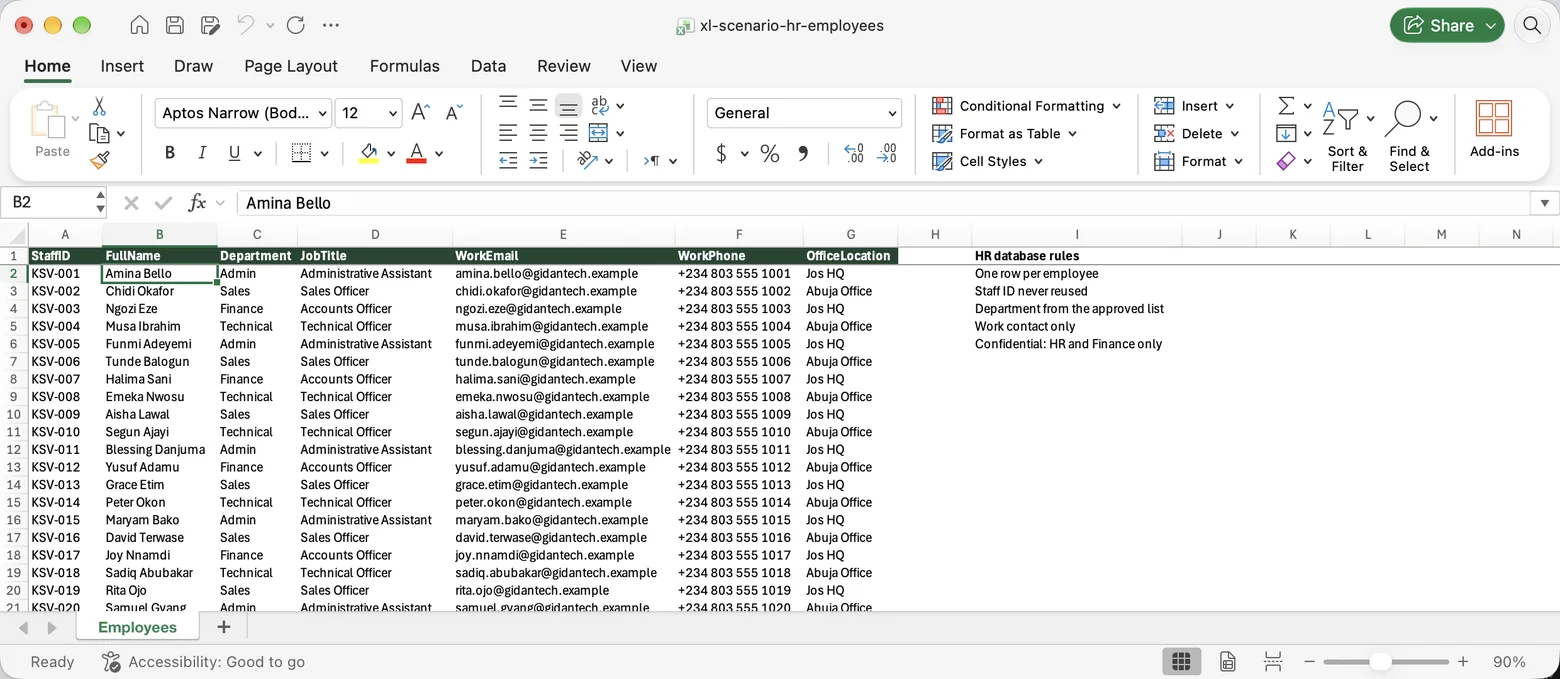
- Open xl_staff_contacts.csv as the employee list.
- Keep one row per employee and never reuse a staff ID.
- Use work contact details only.
- Mark the file confidential: HR and Finance only.
Build the employee database
Sheets: Employees, Attendance, Payroll, Assumptions and Report. On Employees use Staff ID, Full Name, Department, Job title, Date employed, Employment type, Work email, Work phone and Status (Active, On leave, Exited). Do not store home addresses, BVNs, bank account numbers or medical data in this practice file. Use validation lists, a table and a protected header. Add a count of active staff with =COUNTIF(Employees[Status],"Active") and reconcile it with the payroll list.
Prepare the attendance register
On Attendance use Date, Staff ID, Full Name, Department, Expected time, Time in, Time out, Status and Remarks. Use validation for Status: Present, Late, Absent, Leave, Official duty. Calculate lateness with =IF(OR(F2="",F2<=TIME(8,0,0)),"On time","Late"). Build a monthly summary with COUNTIFS by department and status. Keep one row per employee per day and make clear that the attendance data is fictional. Access should be limited to HR and the line manager.
Create the basic salary calculation sheet
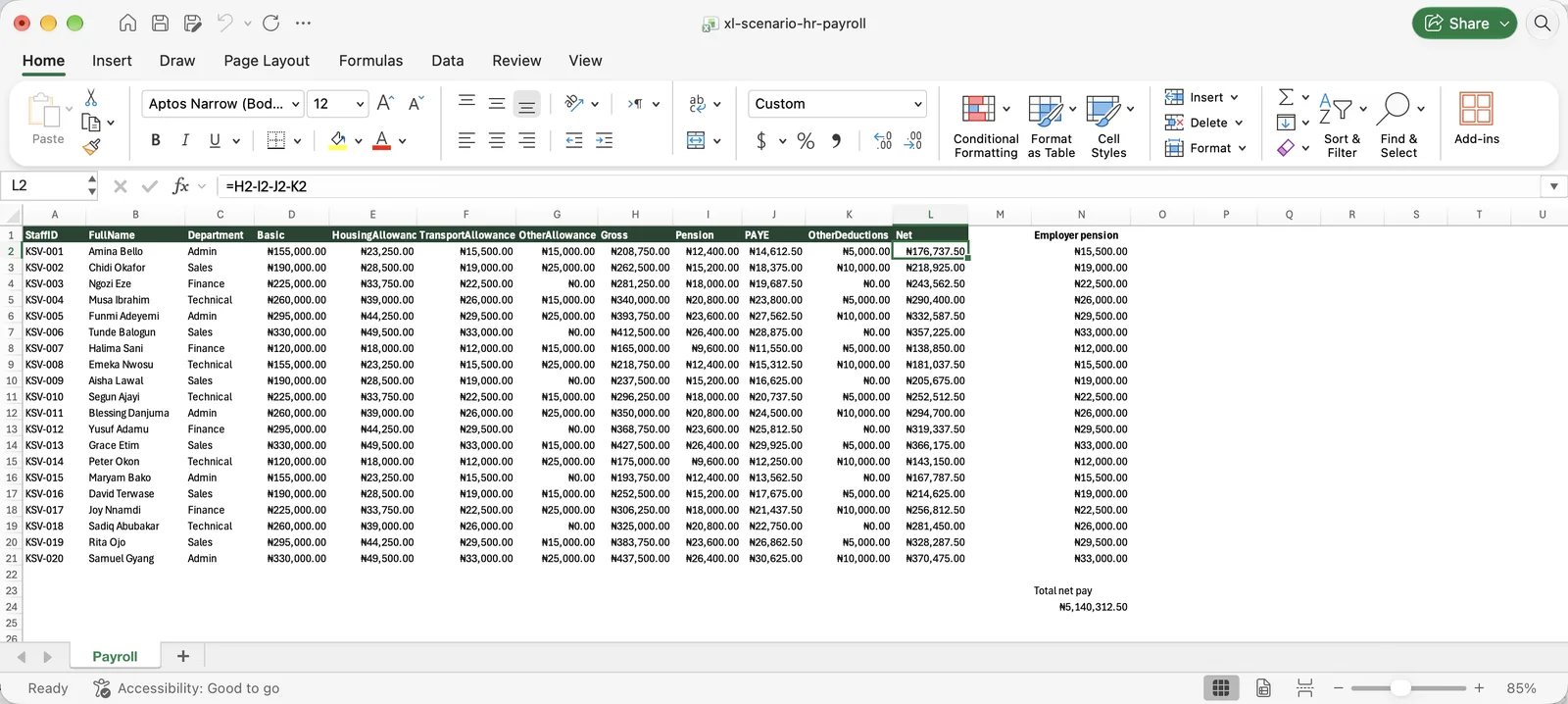
On Payroll use Staff ID, Name, Basic, Housing allowance, Transport allowance, Other allowance, Gross, Pension, PAYE, Other deductions, Net. Gross = SUM of earnings. Net = Gross − deductions. Use supplied assumptions, for example housing at 15% of basic and transport at 10%, placed on the Assumptions sheet and referenced with absolute cells. The numbers here are teaching examples only. Real payroll must use the organisation's approved rates and be reviewed by a qualified payroll or tax officer.
Calculate allowances and deductions
Reference the assumptions rather than hard-coding rates: =Basic*Assumptions!$B$2. Round to two decimal places: =ROUND(...,2). For pension and PAYE, use the fictional rates supplied in the practice file, label them clearly and add a note: 'Fictional training assumption — not tax advice.' Add a check column: Gross − deductions must equal Net. Add a control total for gross and net. If a figure looks unusual, inspect the row before assuming the formula is wrong.
Try it yourself — step by step
- Open xl_payroll_sample.csv.
- In H2 type =D2+E2+F2+G2 for gross pay and copy down.
- In L2 type =H2-I2-J2-K2 for net pay and copy down.
- Add employer pension with =D2*0.1 and total net pay with =SUM(L2:L21).
Prepare the payroll summary and employee reports
On Report, summarise by department: headcount, total gross, total deductions, total net and average net. Use SUMIFS and COUNTIFS against the Payroll table. Build an employee statement sheet that shows one staff member's earnings and deductions. Add a reconciliation: total net payroll must equal the sum of individual net figures. For an HR report in Word, include headcount, attendance highlights, payroll totals and three recommendations. Keep personal details out of the narrative.

Build the prompt from three phrases — Role, Task and Format — and watch the AI answer.
Create the HR presentation and AI documentation
Build a six-slide PowerPoint: title, headcount by department, attendance highlights, payroll summary (fictional), risks and next steps. Use aggregate figures, never individual salaries. Use Gemini or ChatGPT to draft the HR memo and the presentation speaker notes from fictional, aggregate data. Do not paste real employee names or salary records into a public tool. Check every figure against the workbook, rewrite the tone and remove any invented policy.
Step-by-step: assemble the HR practice system
1) Create the five sheets and the Assumptions page. 2) Enter the 20 fictional employees. 3) Build the attendance register with validation and a monthly summary. 4) Build the payroll columns and reference the assumptions with absolute cells. 5) Add the Net check and control totals. 6) Build the department summary with SUMIFS. 7) Create the one-employee statement view. 8) Draft the Word report and the six-slide presentation. 9) Use AI only with aggregate fictional data. 10) Reconcile headcount, gross, deductions and net before saving.
Confidentiality, disclaimers and real-world limits
This scenario uses fictional records and simplified assumptions. It does not cover every allowance, deduction, tax rule or statutory change. Real payroll requires authorised rates, secure storage, access controls, audit trails and qualified review. Never send a payroll file by ordinary WhatsApp or paste it into a public AI tool. Before any real use, confirm the current rules with the appropriate authority and your finance team. Educational exercise only — not professional payroll or tax compliance advice.
Common mistakes to avoid
Common mistakes include hard-coding tax rates in every row, storing bank details in an unprotected sheet, sharing payroll by WhatsApp, and presenting individual salaries in a management deck. Others are forgetting the Net check, mixing active and exited staff, and treating fictional assumptions as real tax advice. Use an Assumptions sheet, protect sensitive columns, reconcile totals and keep individual records out of presentations.
Practice exercise
Using the downloadable payroll sample, build the five-sheet HR practice system with 20 fictional employees. Reference the assumptions with absolute cells, add a Net check and reconcile headcount, gross, deductions and net. Create a department summary and a one-employee statement. Then draft a Word report and a six-slide aggregate presentation. Do not use real employee data.
Lesson summary
An HR practice system needs an employee database, attendance register, payroll sheet, assumptions page and summary report. Use validation, absolute references and reconciliation checks. Keep personal and salary data protected. Use AI only with aggregate fictional data. The exercise is educational and does not replace professional payroll or tax compliance advice.
Open Claude (free tier) and paste this prompt there. Handles sensitive HR and payroll wording carefully; a human still approves every output.
You are an HR systems trainer for a Nigerian organisation. Design a simple payroll summary by department using fictional data as a summary table with the SUMIFS formulas and a reconciliation check.
Why this tool: Handles sensitive HR and payroll wording carefully; a human still approves every output.
Hit a free limit? Switch to ChatGPT or Gemini and continue — the prompt works in any assistant.
Answer all three questions and check your answers to unlock the next lesson. Pass mark: 2 of 3.
A payroll file should be shared…
The Net pay check should confirm that…
This payroll scenario is…