
Practical Excel for Office Work
Listen to this lesson
Nigerian voice narration
Fictional training case. Your supervisor has seen what Excel can do and now wants eight templates for the unit: attendance, payroll, expenses, sales, inventory, student results, budget and a monthly report. She does not want eight separate projects built from scratch; she wants a small set of reliable patterns you can adapt. This module gives you the column layout, the key formulas and the safeguards for each template.

Introduction and learning objectives
This lesson applies Excel to eight common Nigerian office registers: staff attendance, salary and payroll tracking, office expenses, sales and revenue, inventory, student results, budget and expenditure, and a monthly performance report. By the end you should be able to choose the right columns, write the key formulas, protect sensitive data and adapt one template to a new unit without starting over.
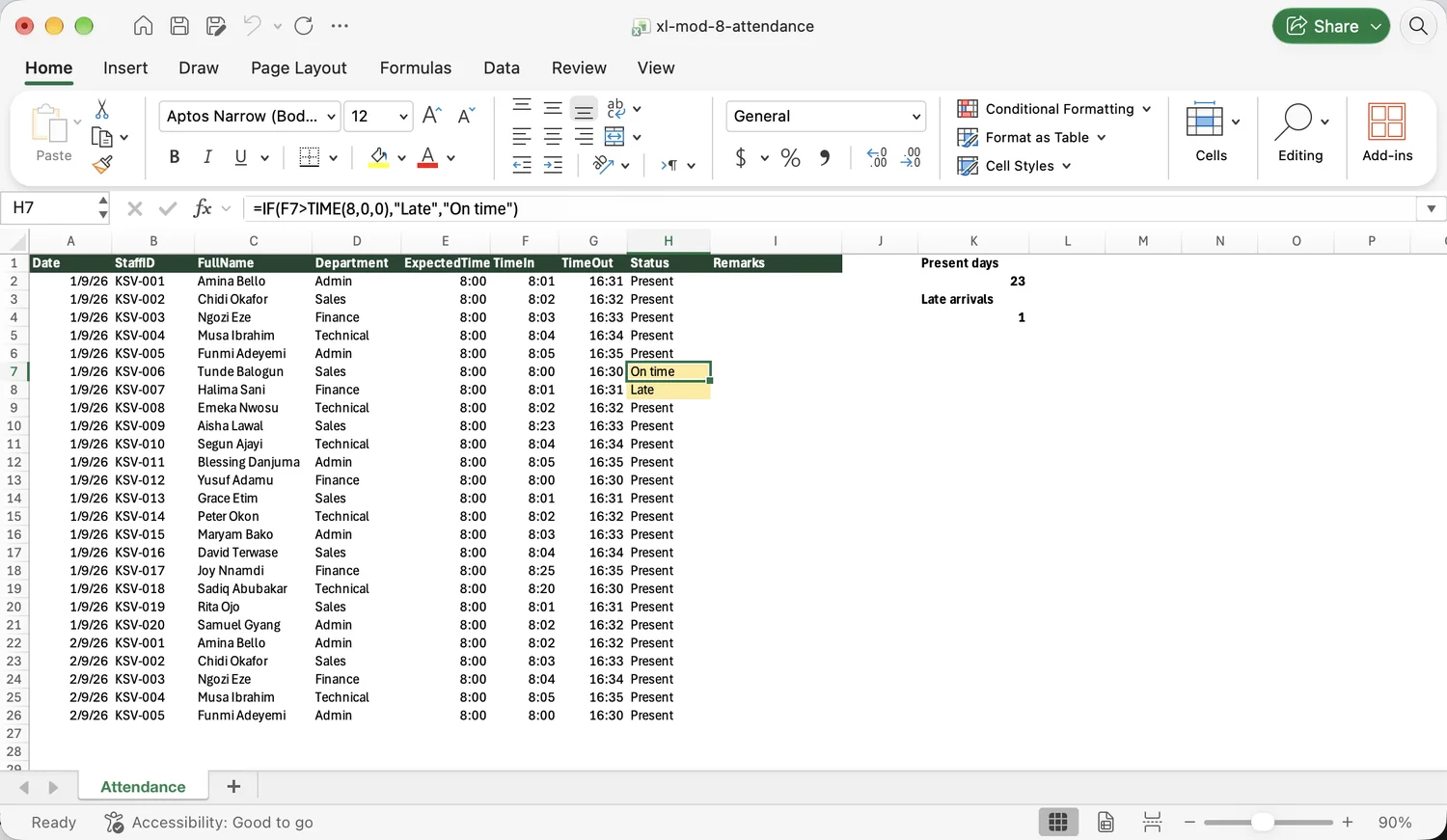
Try it yourself — step by step
- Open xl_staff_attendance.csv and add a Status column in H.
- Fill Present, Late, Absent or Leave for each day.
- In K2 type =COUNTIF(H2:H26,"Present").
- Flag lateness with =IF(F7>TIME(8,0,0),"Late","On time").
Staff attendance register
Columns: Date, Staff ID, Name, Unit, Expected time, Time in, Time out, Status, Remarks. Use a data validation list for Status: Present, Late, Absent, Leave, Official duty. Calculate lateness with =IF(OR(F2="",F2<=TIME(8,0,0)),"On time","Late") and hours worked with =(G2-F2)*24 formatted as a number. Add a monthly summary with COUNTIF for each status. Keep one row per staff per day; never merge cells. This register contains personal data, so share only with HR and the unit head.
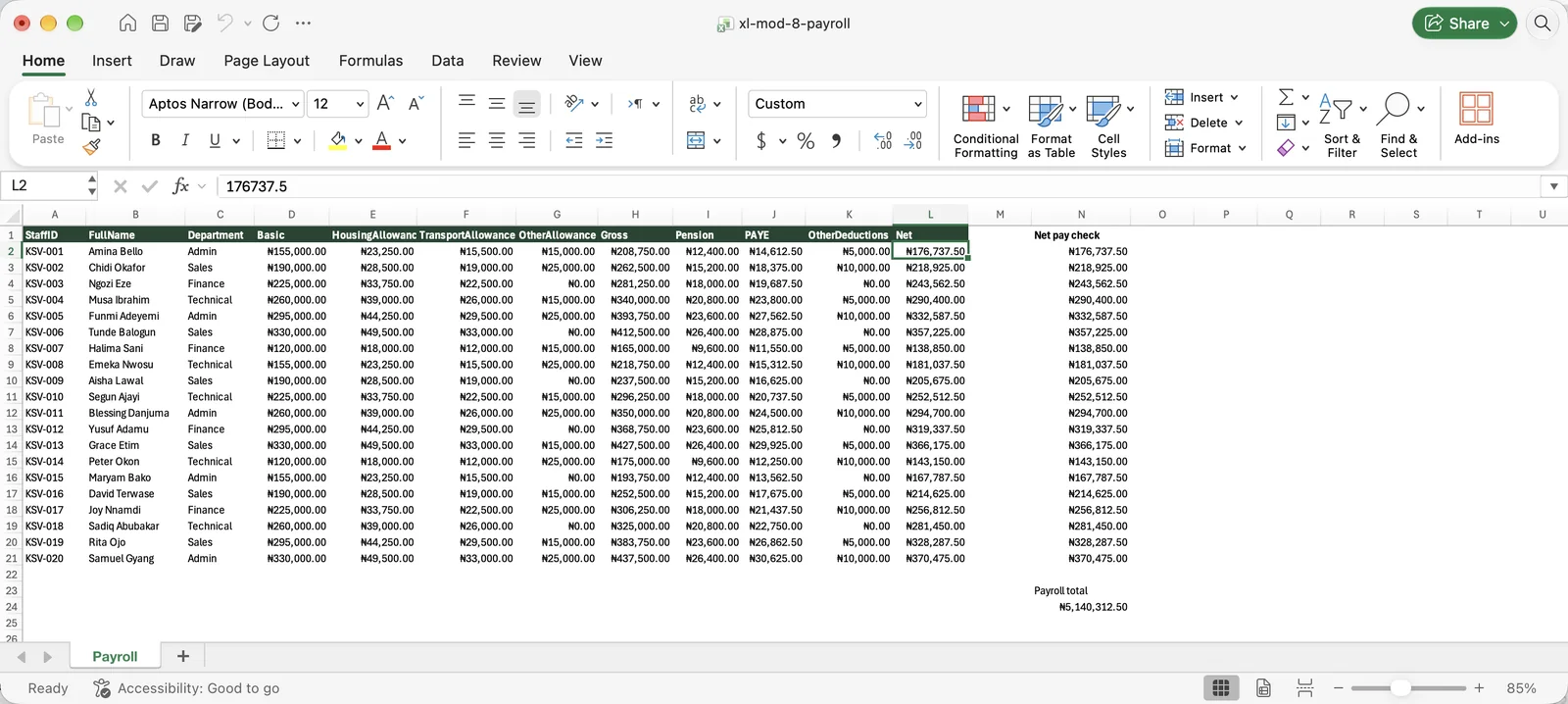
Try it yourself — step by step
- Open xl_payroll_sample.csv.
- In N1 type Net pay check and in N2 type =H2-I2-J2-K2.
- Copy down and format N as Naira currency.
- Add a payroll total with =SUM(L2:L21).
Staff salary and payroll tracker
Columns: Staff ID, Name, Basic, Housing, Transport, Other allowances, Gross, PAYE, Pension, Other deductions, Net. Gross = SUM of earnings. Net = Gross minus deductions. Use =SUM(E2:I2) and =J2-SUM(K2:M2). Keep rates and statutory tables on a separate assumptions sheet, not hard-coded in every row. This course does not provide tax or pension advice: use your organisation's approved rates and have payroll checked by a qualified officer. Store the file with restricted access and never paste salary data into a public AI tool.
Office expense and sales trackers
An expense register needs Date, Voucher, Department, Category, Description, Amount, Approved by and Receipt. A sales tracker needs Date, Invoice, Customer, Product, Quantity, Unit price, Amount, Branch and Payment status. In both, use a table, validation lists and a control total. Add a summary sheet with SUMIFS by month and category. For sales, calculate =Quantity*UnitPrice in a formula column and check it against the invoice total. Keep customer phone numbers out of any file you share publicly.
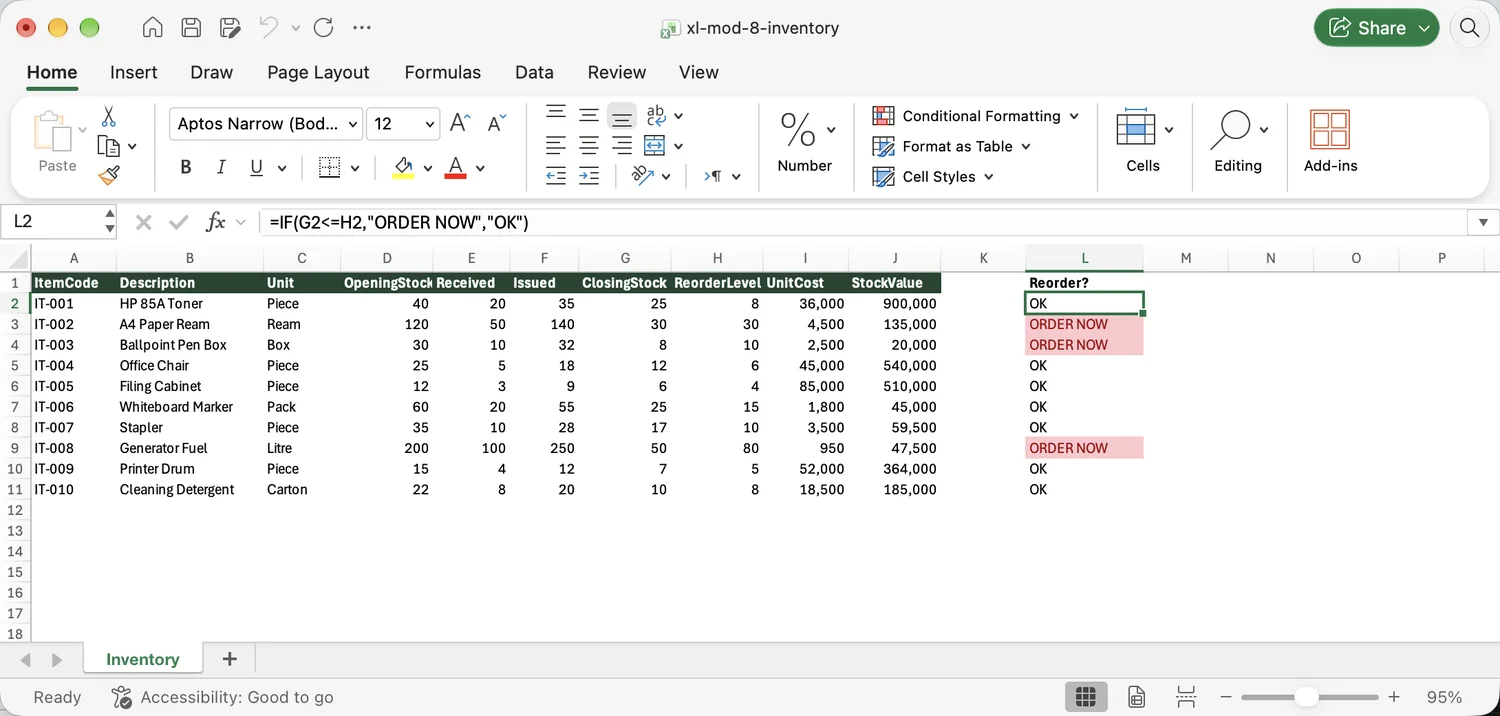
Try it yourself — step by step
- Open xl_inventory.csv.
- In L1 type Reorder? and in L2 type =IF(G2<=H2,"ORDER NOW","OK").
- Copy the formula down the register.
- Add conditional formatting so ORDER NOW rows turn red.
Inventory and stock register
Columns: Item code, Description, Unit, Opening stock, Received, Issued, Closing stock, Reorder level, Unit cost, Stock value. Closing = Opening + Received − Issued. Stock value = Closing × Unit cost. Add a conditional format that turns the row red when Closing is below Reorder level. Use a separate Issues sheet with Date, Item code, Quantity, Collected by and Purpose, then sum issues with SUMIF. Reconcile physically at least monthly; a spreadsheet is only as good as the count behind it.
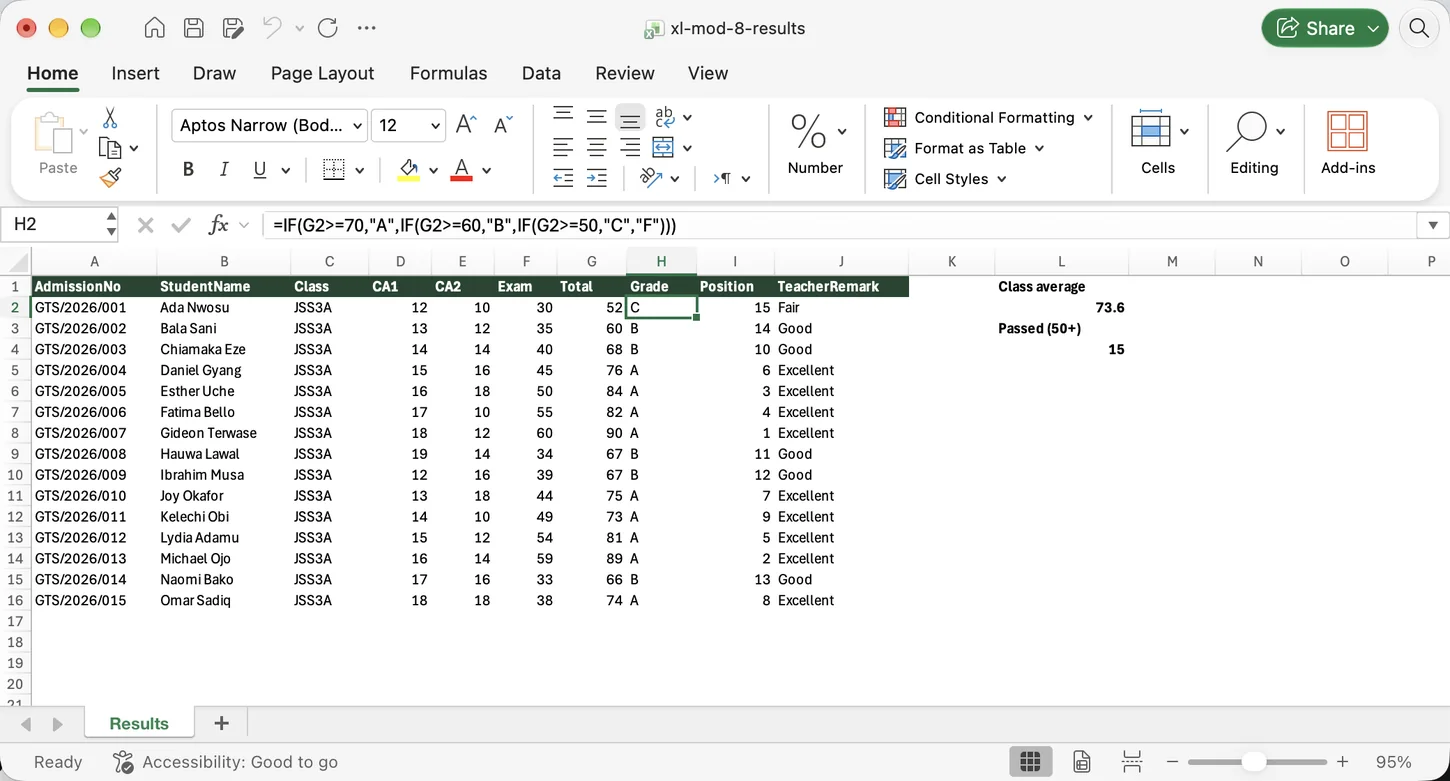
Try it yourself — step by step
- Open xl_student_results.csv.
- In G2 type =D2+E2+F2 and copy down.
- In H2 type =IF(G2>=70,"A",IF(G2>=60,"B",IF(G2>=50,"C","F"))).
- Add =AVERAGE(G2:G16) and =COUNTIF(G2:G16,">=50") in L2:L4.
Student result sheet
Columns: Admission no, Student name, Class, Subject scores for CA1, CA2, Exam, Total, Grade, Position, Teacher remark. Total = CA1 + CA2 + Exam, with weights agreed by the school. Grade with a lookup table or IFS, not a long nested IF. Position with =RANK.EQ(Total, range, 0). Keep personal data private and avoid sharing identifiable results in WhatsApp groups. This template is for learning; schools must follow their own examination and records policies.
Try it yourself — step by step
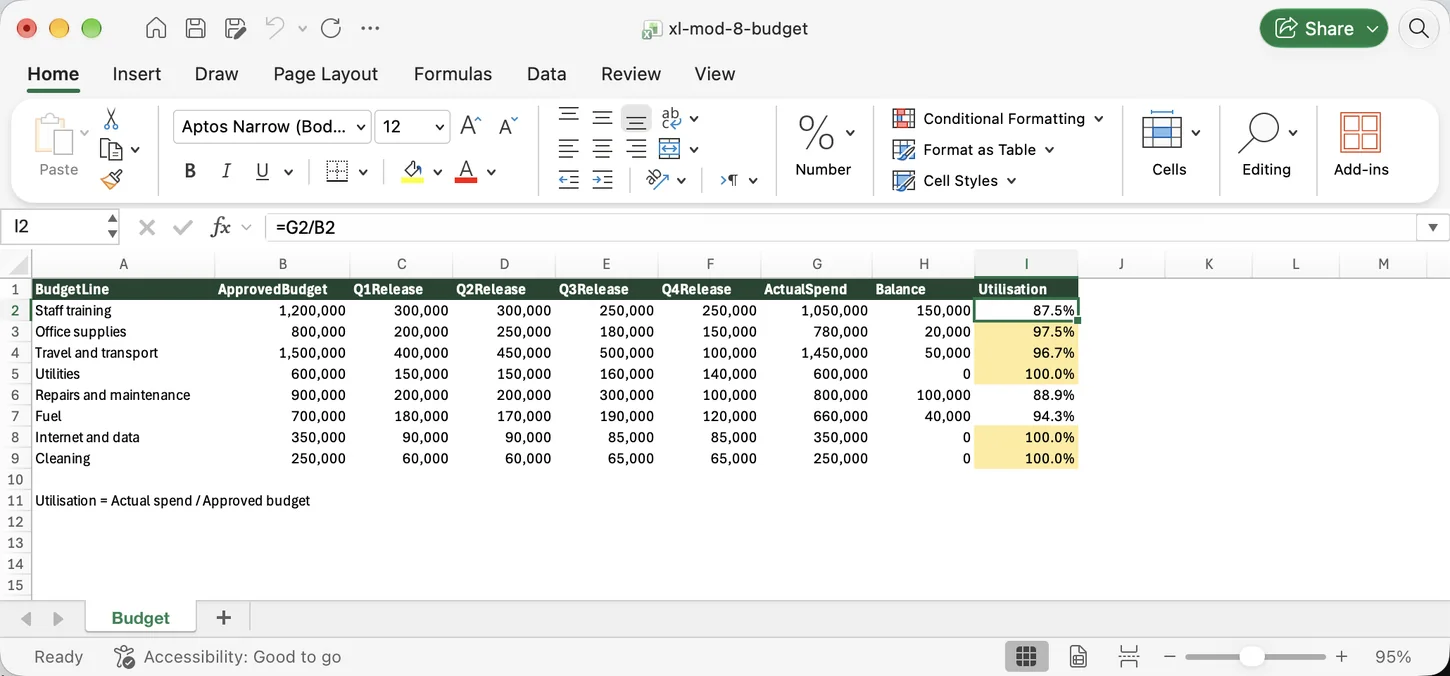
- Open xl_budget_tracker.csv.
- In H2 type =B2-G2 for the remaining balance.
- In I2 type =G2/B2 and format it as 0.0%.
- Add conditional formatting that turns utilisation at or above 95% yellow.

Build the prompt from three phrases — Role, Task and Format — and watch the AI answer.
Budget and expenditure tracker
Columns: Budget line, Approved budget, Q1–Q4 releases, Actual spend, Balance, Utilisation %. Balance = Budget − Actual. Utilisation % = Actual / Budget, formatted as a percentage; use IFERROR for a zero budget. Add conditional formatting above 90% and a flag for overspend. Keep one row per budget line per period and a summary with SUMIFS. Never overwrite the approved budget; add a change log with date, old value, new value and approver.
Monthly performance report
A one-page report should answer: What did we plan? What happened? What changed? What do we do next? Pull figures from the trackers with SUMIFS or links, not by retyping. Include a small trend table, one chart and three short sections: Highlights, Variances, Actions. State the period and the source file. Use consistent Naira formatting. Keep the report to one page; attach the detailed register separately. A manager should understand the message in under a minute.
Step-by-step and template discipline
1) Create one workbook per register, not one sheet for everything. 2) Put headers in row 1 and data from row 2. 3) Convert to a table, name it and freeze the header. 4) Add validation lists for status, department and category. 5) Put rates and lists on an Assumptions sheet. 6) Add a Summary sheet with SUMIFS and COUNTIFS. 7) Protect formula cells and leave input cells unlocked. 8) Save a blank master template separately. 9) Test with ten fictional rows before real data. 10) Record the version, date and person who changed the template.
Common mistakes to avoid
A frequent mistake is building one giant sheet for every register, which becomes impossible to protect or audit. Others include hard-coding tax or pay rates in every row, merging cells, typing totals instead of formulas, and sharing payroll or student files in public groups. Another is using a template without testing it on fictional data first. Keep a blank master, test with sample rows and protect sensitive columns before real staff data enters the file.
Practice exercise
Choose two templates from this lesson that you actually need at work. Build them with fictional data, a validation list, a formula column and a small summary. Protect the formula cells, save a blank master and write a five-line instruction sheet for a colleague. Do not use real staff, payroll or student data for this exercise.
Lesson summary
Most office registers follow the same pattern: clear headers, one record per row, validation lists, formula columns, a summary sheet and protection for sensitive or calculated cells. Attendance, payroll, expenses, sales, inventory, results and budgets each need their own file and their own access rules. Test with fictional data, keep a blank master and never paste confidential records into public AI tools.
Open Microsoft Copilot (free tier) and paste this prompt there. Proposes register layouts and formulas for attendance, payroll and stock templates.
You are an office systems trainer. Design a simple attendance register and a monthly summary in Excel as a table layout with column names and 5 key formulas.
Why this tool: Proposes register layouts and formulas for attendance, payroll and stock templates.
Hit a free limit? Switch to ChatGPT or Gemini and continue — the prompt works in any assistant.
Answer all three questions and check your answers to unlock the next lesson. Pass mark: 2 of 3.
Where should payroll tax and pension rates be kept?
A good monthly report should…
Before entering real staff data into a new template, you should…