
OpenProject: work packages, schedules and Gantt charts
Listen to this lesson
Nigerian voice narration
Fictional training case. The Plateau State ICT Agency is installing internet connectivity in 30 secondary schools over six months. The project has 150 tasks with many dependencies — survey before procurement, procurement before installation — and the agency's auditors want a formal schedule. The Director prefers open-source software the agency can host itself. OpenProject fits well. This lesson gets you started.

Introduction and objectives
OpenProject is an open-source project management tool strong in classic planning: work packages, Gantt charts and dependencies. In this lesson you will start a free trial or community edition, create work packages, build a schedule, view it as a Gantt chart and link dependencies. By the end you should be able to plan a structured project in OpenProject.
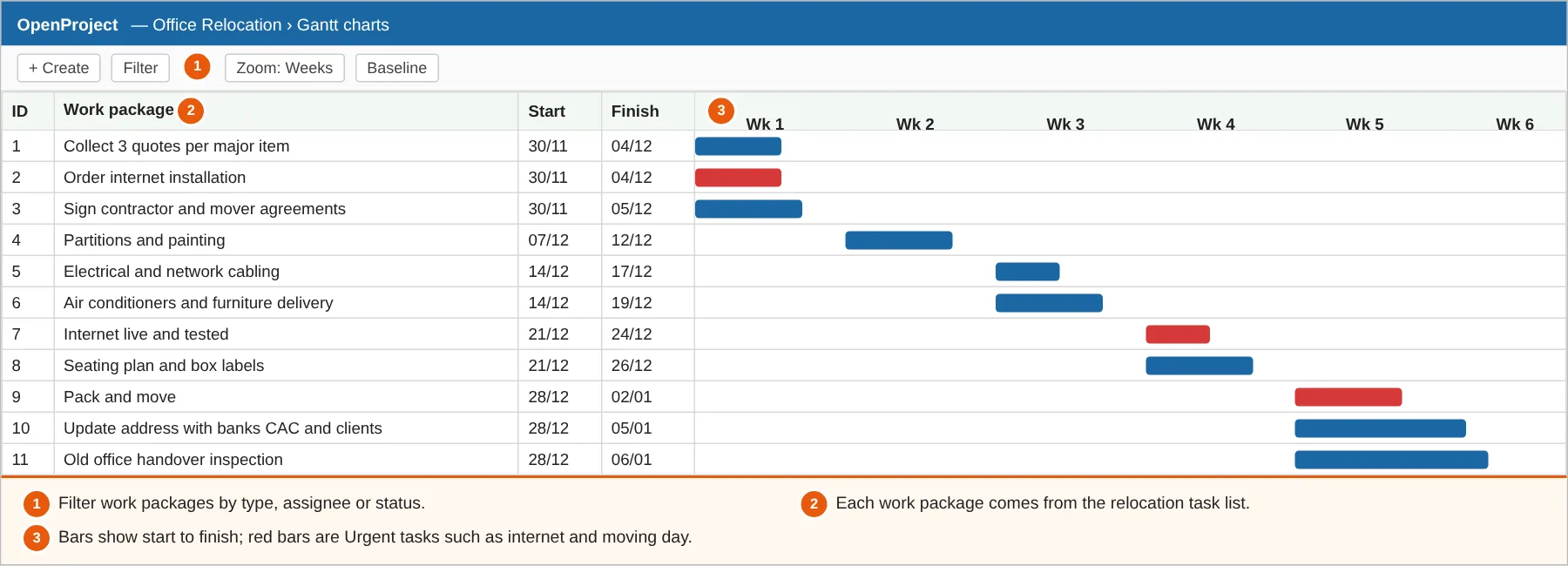
Try it yourself — step by step
- Create a project in OpenProject: Office Relocation.
- Open Work packages and add each task with a start and finish date.
- Click Gantt charts in the left menu.
- Set Zoom to Weeks and check that bars follow the weekly plan.
- Drag a bar's edge to change dates; the table updates automatically.
Step 1: getting OpenProject
OpenProject has a free Community edition that IT teams can install on their own server, and a hosted cloud version with a free trial at openproject.org. Click 'Start free trial', enter your email and organisation name, and confirm. Then click '+ Project', name it 'Schools Connectivity 2026', and choose the modules: Work packages, Gantt charts, Team planner and Wiki.
Step 2: understanding work packages
In OpenProject, every item of work is a work package. Types include Phase, Milestone, Task and Bug. A phase such as 'Site Survey' contains tasks like 'Survey Government Secondary School, Bukuru'. Each work package has a subject, assignee, status, start and finish dates, estimated time and description. Use parent–child relationships to build your WBS.
Step 3: creating the schedule
Open Work packages and click '+ Create'. Add phases: Survey (weeks 1–4), Procurement (weeks 5–10), Installation (weeks 11–22), Testing and Handover (weeks 23–26). Add tasks under each with start and finish dates. Add milestones such as 'Equipment delivered' and 'All schools live'. Dates can be typed or dragged in the Gantt view.

Build the prompt from three phrases — Role, Task and Format — and watch the AI answer.
Step 4: Gantt chart and dependencies
Click 'Gantt charts' to see bars on a timeline. To link tasks, right-click a work package and choose 'Add predecessor' or 'Add follower', or drag from one bar's end to another. Now if procurement slips one week, OpenProject automatically moves installation tasks. Use 'Baseline' comparison to show auditors how the current schedule differs from the approved plan.
Common mistakes to avoid
Common errors include creating hundreds of unlinked tasks so the Gantt cannot show the true impact of delays, using wrong work package types (tasks instead of milestones), and not saving a baseline. Another is choosing self-hosting without IT staff to maintain backups and updates.
Practice exercise
Start an OpenProject trial. Create a project with four phases, at least twelve tasks and two milestones. Link at least six dependencies and open the Gantt chart. Move one early task by a week and note which tasks shift automatically.
Lesson summary
OpenProject manages work as work packages of different types. Build a structured schedule with phases, tasks and milestones, link dependencies, and use the Gantt chart and baselines to track the plan. It suits formal, dependency-heavy projects.
You are an OpenProject implementation specialist. Outline the work packages for a six-month project connecting 30 schools to the internet as phases with weeks, example tasks and milestones.
Answer all three questions and check your answers to unlock the next lesson. Pass mark: 2 of 3.
After linking dependencies, delaying procurement in OpenProject will…
'All schools live' should be created as which work package type?
Comparing the current schedule with the approved plan uses a…