
Trello: boards, lists, cards and your first project board
Listen to this lesson
Nigerian voice narration
Fictional training case. Hope Foundation, a small Kaduna NGO, is planning a back-to-school drive giving 500 pupils bags and books. The volunteers are not technical and find complex tools confusing. The coordinator wants 'something simple, like sticky notes on a wall, but on our phones'. Trello is ideal. This lesson walks you through creating a free account and building the project board.

Introduction and objectives
Trello is a simple, visual Kanban tool built on boards, lists and cards. In this lesson you will create a free account, understand Trello's building blocks and set up a project board with tasks, members, due dates and checklists. By the end you should be able to run a small project on Trello.
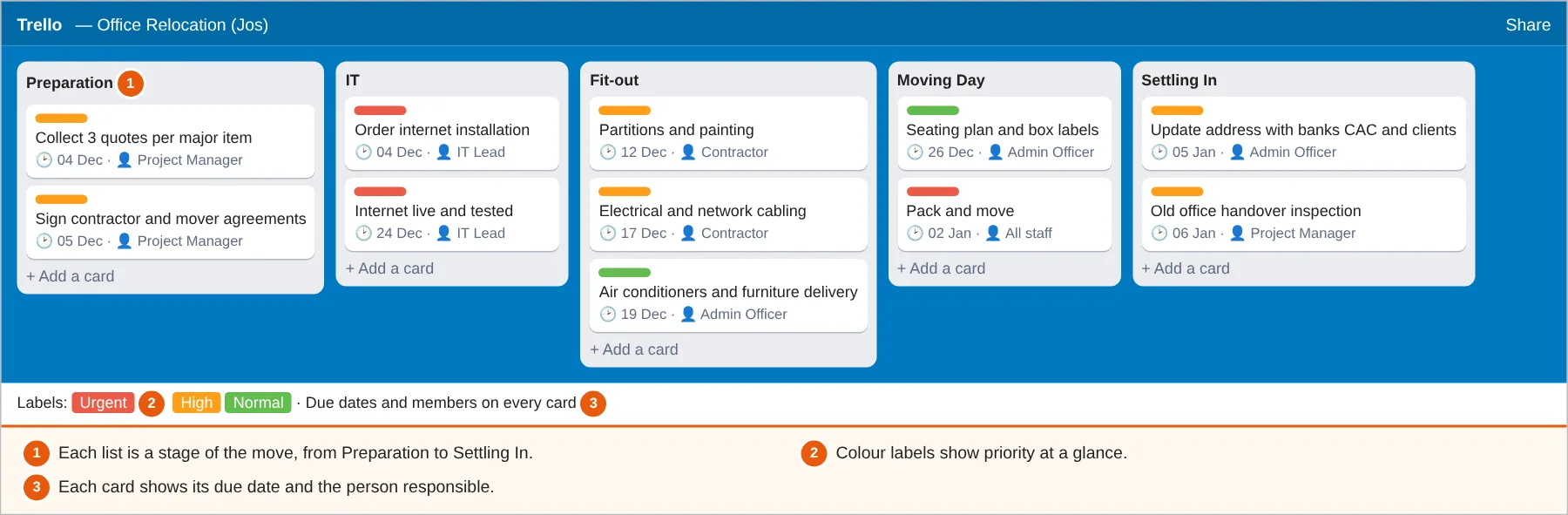
Try it yourself — step by step
- Create a board called Office Relocation.
- Add lists: Preparation, IT, Fit-out, Moving Day, Settling In.
- Add a card for each task in pm_relocation_tasks.csv under its List.
- Open each card: add the due date, the member and a priority label.
- Drag cards to the right as work moves forward.
Step 1: create a free account
Go to trello.com and click 'Sign up — it's free'. Use your email or Google account and confirm it. Trello creates a Workspace for you; rename it 'Hope Foundation'. Install the Trello app on your phone so you can update cards in the field. The free plan allows up to ten boards per workspace.
Step 2: boards, lists and cards
A board is one project: 'Back-to-School Drive 2026'. Lists are columns representing stages: 'To Do', 'In Progress', 'Waiting', 'Done'. Cards are tasks that move across lists: 'Get quotes for 500 school bags', 'Confirm pupil list with headteachers', 'Book distribution venue'. Moving a card left to right shows progress.
Step 3: create the board and add cards
Click 'Create' → 'Create board', name it and choose a background. Add the four lists. Under 'To Do', click '+ Add a card' and type each task. Open a card to add a description: 'Need 500 bags; budget ₦3,500 each; three quotes needed'. Use labels (coloured tags) for categories: green for Procurement, blue for Logistics, red for Urgent.

Build the prompt from three phrases — Role, Task and Format — and watch the AI answer.
Step 4: members, due dates and checklists
Click 'Share' to invite volunteers by email or link. Open a card, click 'Members' to assign it, and 'Dates' to set a due date and reminder. Click 'Checklist' to add steps such as 'Quote 1', 'Quote 2', 'Quote 3', 'Choose supplier'. The card shows a progress counter like 2/4, and overdue dates turn red.
Common mistakes to avoid
Beginners often create one list per person instead of per stage, which hides the workflow. Others cram many tasks into one card, leave cards unassigned, or forget to move cards when work progresses so the board becomes stale. Archive finished cards regularly instead of letting 'Done' grow to hundreds.
Practice exercise
Create a free Trello account and a board for an event or community project. Add four lists, at least ten cards with labels, assign members to five cards, set due dates and add a checklist to two cards. Move two cards to 'In Progress'.
Lesson summary
Trello uses boards for projects, lists for stages and cards for tasks. Create a board, add stage lists and cards, then use labels, members, due dates and checklists to manage work. Its simplicity suits small teams and non-technical volunteers.
You are a Trello trainer for NGOs. Design a Trello board for a back-to-school drive giving 500 pupils bags and books as lists with 3 example cards each.
Answer all three questions and check your answers to unlock the next lesson. Pass mark: 2 of 3.
Lists on a Trello project board should usually represent…
500 bags at ₦3,500 each cost…
Coloured tags on Trello cards used for categories are called…