
Preparing a simple project budget in Excel
Listen to this lesson
Nigerian voice narration
Fictional training case. Your MD at Naz-Tech asks for a budget for the company's ₦2.5 million end-of-year customer appreciation dinner in Jos by tomorrow morning, 'in Excel, with totals and what we have spent so far'. You have the item list on paper. This lesson takes you step by step through building a clean budget sheet with formulas, variance and a simple chart.

Introduction and objectives
Excel is the most common tool for project budgets in Nigerian offices. In this lesson you will build a budget sheet with quantities, unit costs, totals, actual spending and variance, using simple formulas. By the end you should be able to produce and update a budget that management can read in seconds.
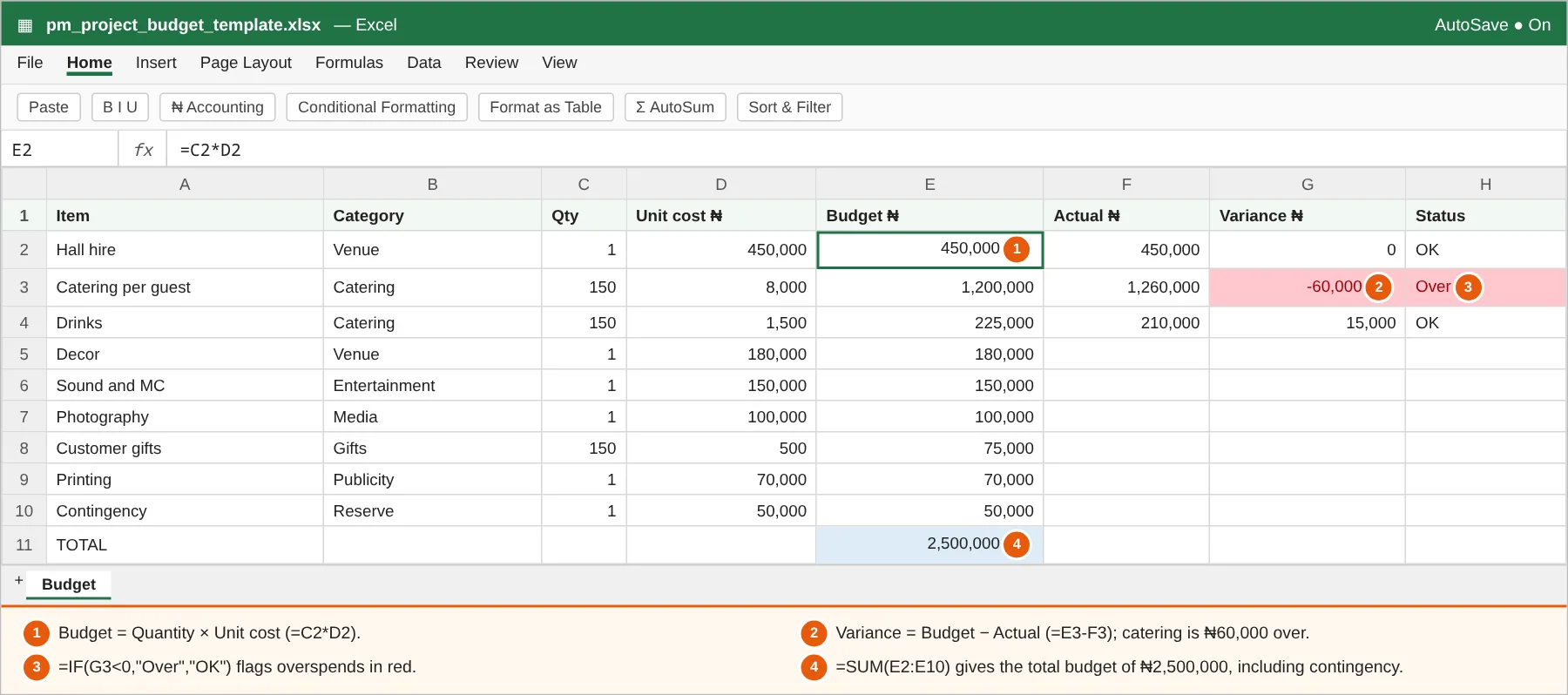
Try it yourself — step by step
- Open pm_project_budget_template.csv in Excel.
- In E2 type =C2*D2 and copy down for every item.
- In G2 type =E2-F2 for the variance and copy down.
- In H2 type =IF(G2<0,"Over","OK") and add red conditional formatting.
- In E11 type =SUM(E2:E10) for the total budget.
Step 1: set up the columns
Open Excel and save the file as Dinner_Budget_2026.xlsx. In row 1 type the headers: Item, Category, Quantity, Unit Cost (₦), Budget (₦), Actual (₦), Variance (₦), Status. Enter one item per row from row 2: hall hire, catering for 150 guests, drinks, décor, sound and MC, photography, gifts, printing. Do not merge cells or add a title above the headers.
Step 2: formulas for budget and variance
In E2 type =C2*D2 and press Enter, then drag the fill handle down. Catering for 150 guests at ₦8,000 gives ₦1,200,000. In G2 type =E2-F2 to show the variance: positive means under budget, negative means overspent. In H2 type =IF(F2>E2,"Over","OK") and fill down so problems stand out.
Step 3: totals and formatting
Below the last item type TOTAL and use =SUM(E2:E9), =SUM(F2:F9) and =SUM(G2:G9). Select the money columns and choose Number Format → Currency with the ₦ symbol or a comma style. Use Home → Conditional Formatting → Highlight Cells Rules → Text that Contains 'Over' with light red fill. Freeze the header row with View → Freeze Panes.

Build the prompt from three phrases — Role, Task and Format — and watch the AI answer.
Step 4: summarise and chart
Insert a PivotTable or use =SUMIF(B:B,"Catering",E:E) to total by category. Then select Category and Budget totals and Insert → Clustered Column chart, adding Actual as a second series to compare. Update the Actual column every time a payment is made, and the totals, variances and chart update automatically.
Common mistakes to avoid
Typing totals by hand instead of formulas is the most dangerous mistake: when a unit cost changes, the total stays wrong. Other mistakes include mixing text like '₦50k' in number cells, merging header cells so sorting breaks, and forgetting to update actuals. Always cross-check the grand total with a calculator once.
Practice exercise
Download the budget template. Fill in at least eight items for the customer dinner within ₦2.5 million, add formulas for Budget, Variance and Status, enter actual amounts for four items, and create a column chart comparing budget and actual by category.
Lesson summary
Build budgets in Excel with clear headers, one item per row and formulas for totals and variances. Use IF and conditional formatting to flag overspending, SUMIF or PivotTables to summarise by category, and a chart to show budget versus actual.
You are an Excel trainer for project officers. Give step-by-step instructions to build a project budget sheet with budget, actual, variance and an over-budget flag as 6 numbered steps with the exact formulas.
Answer all three questions and check your answers to unlock the next lesson. Pass mark: 2 of 3.
Which formula calculates Budget from Quantity in C2 and Unit Cost in D2?
=IF(F2>E2,"Over","OK") returns 'Over' when…
Catering for 150 guests at ₦8,000 per head costs…