
Introduction to OrangeHRM and Choosing HR Software
Listen to this lesson
Nigerian voice narration
Fictional training case. Fictional case. The MD of Zamani Foods has seen adverts for several HR systems and asks you to compare Zoho People and OrangeHRM. The company has 40 staff, one IT support officer and a limited budget. You must recommend a practical option, including what to do if self-hosting is not possible.

Introduction and learning objectives
This lesson introduces OrangeHRM, its Starter and cloud options, employee management, recruitment, leave and time tracking, and compares it with Zoho People. It then sets out the criteria for choosing HR software and a practical alternative for organisations that cannot install or pay for a system. By the end you should be able to make a reasoned recommendation rather than choosing by advert.
What OrangeHRM is
OrangeHRM is an HR management system available in community and commercial editions. Its modules cover employee records, recruitment, leave, time tracking and reports. The Starter edition is often described as free or open-source, while cloud and advanced editions are paid. Offers and limits change, so verify the current official pages. The key question is not whether it is free, but whether it fits your size, hosting capacity, support needs and data protection obligations.
OrangeHRM Starter, cloud and self-hosting options
You can explore a hosted demo, sign up for a cloud trial where offered, or self-host the community edition. Self-hosting requires a server, a database, PHP and web-server skills, backups, security updates and someone to fix problems. A small company without an IT team may find cloud easier, even if it costs. If you cannot install or pay, use a controlled Sheets system for the essential processes and revisit software when the budget or staffing changes.
Employee management in OrangeHRM
The employee module stores personal details, job title, department, supervisor, contact information and documents. You can add employees manually or import a list. Configure the organisation structure, locations and job titles first. Decide which fields employees can update themselves. Check the imported data for duplicates and missing supervisors. As with any system, the quality of the output depends on the quality of the input.
Recruitment features
The recruitment module can advertise vacancies, record candidates, track interview stages and store interview notes. It is useful when several people review applications. Before using it, define the stages and the scoring criteria. Do not put unnecessary personal data in candidate notes. Check who can see candidate records and how long they are retained. If the module feels too heavy, a Google Sheets tracker may be simpler for a small number of hires.
Leave management and time tracking
Configure leave types, entitlements, holidays and approval flows. Test a request end to end and check the balance. Time tracking can record attendance or project hours, but it needs a clear policy and consistent use. If staff work shifts, confirm the tool handles them correctly. Compare the configuration to your written policy. A system that calculates leave differently from the handbook will create disputes.

Build the prompt from three phrases — Role, Task and Format — and watch the AI answer.
Comparing Zoho People and OrangeHRM
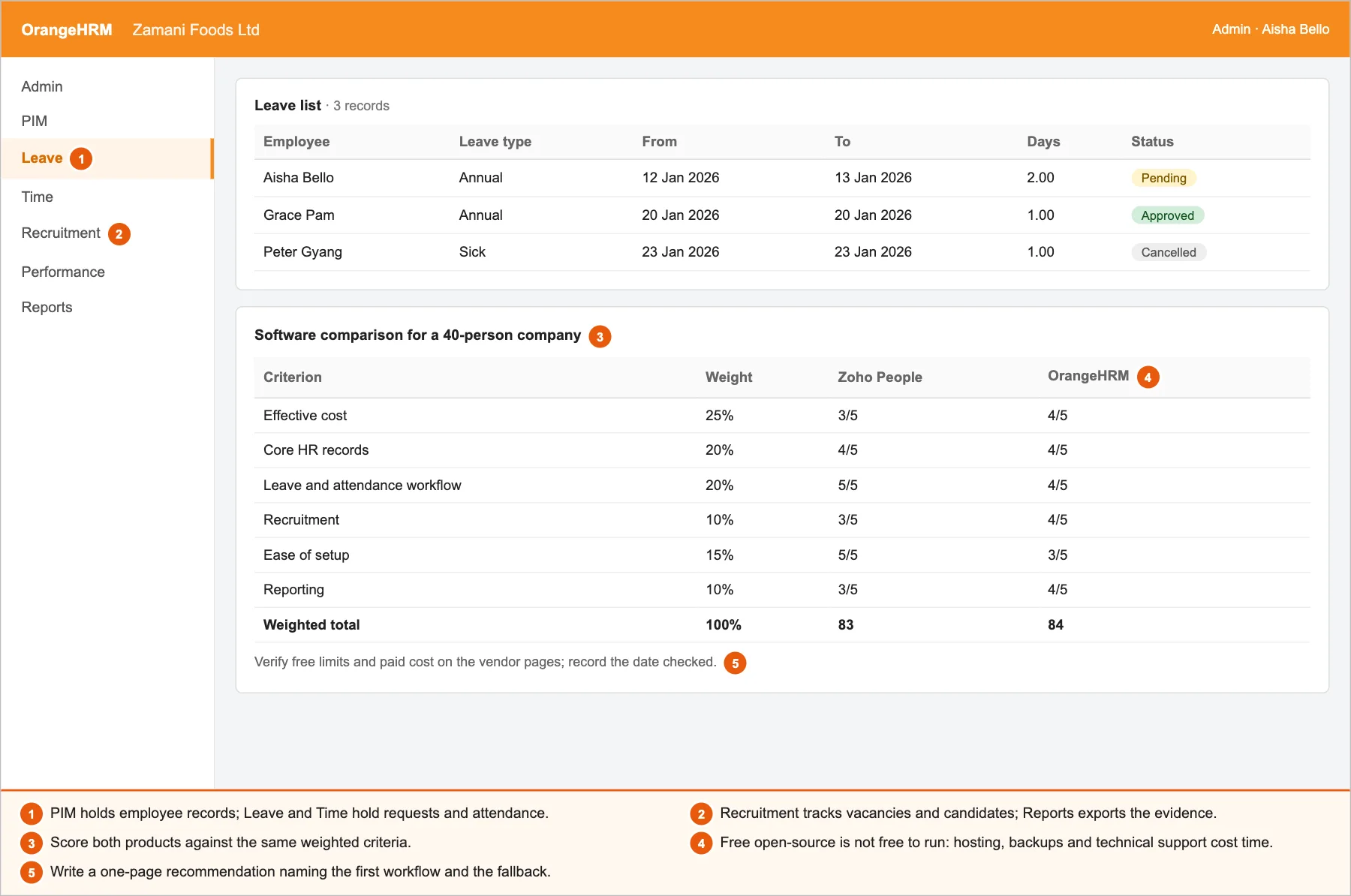
Zoho People is a hosted product with a broad feature set and a familiar interface; it is easy to start but can become costly as headcount and features grow. OrangeHRM offers an open-source/Starter route and more control if you self-host, but it requires technical capacity. Compare them on current price for your headcount, required modules, setup effort, support, data location, ease of use, export options and mobile access. A free licence is not free if it consumes weeks of IT time.
Try it yourself — step by step
- Explore PIM, Leave, Time, Recruitment and Reports.
- Score both products against the same weighted criteria.
- Cost the hosting, backups and support for open-source.
- Verify free limits and paid prices on the vendor pages.
- Write a one-page recommendation with the first workflow and a fallback.
Choosing the right HR software
Write down your must-have needs, nice-to-have needs and constraints. Score each option against them. Check the contract, data ownership, export format and exit process. Confirm how upgrades, backups and support work. Ask for a short trial with fictional data. Involve the people who will use it daily. Choose the simplest system that solves the priority problems, and keep a manual fallback for the first month.
Step-by-step: a one-page software recommendation
1) State the organisation size, current process and top three problems. 2) List must-have and nice-to-have features. 3) Record the current price and free/trial limits for each option. 4) Note hosting and IT requirements. 5) Test the priority workflow with fictional data. 6) Score each option. 7) Recommend one option with a cost, timeline, owner and fallback. 8) Keep the decision note for future review.
Common mistakes to avoid
Common mistakes are choosing by advert, ignoring the IT effort of self-hosting, importing real data before checking export and retention, and assuming a free edition covers the whole workforce. Another mistake is failing to compare the software's leave rules with the handbook. Decide the requirements first, test with fictional data and document the reason for the choice.
Practice exercise
Using the downloadable comparison sheet, score Zoho People and OrangeHRM against six criteria for a 40-person company. Record the current free/trial limits you verified, the likely paid cost and the technical effort. Write a one-page recommendation naming the chosen option, the first workflow to configure and the fallback if the choice fails.
Lesson summary
OrangeHRM can be self-hosted or used through cloud offers; Zoho People is a hosted product. Compare price, modules, setup effort, support, data ownership and exit options. Choose the simplest system that solves the priority needs. If neither fits the budget, use a controlled Sheets process and revisit later.
Open Google Gemini (free tier) and paste this prompt there. Helps compare free and paid HR features using official plan information you confirm.
You are an HR systems adviser. Compare Zoho People and OrangeHRM for a 40-person Nigerian company with one IT support officer as a comparison table with six criteria and a three-sentence recommendation.
Why this tool: Helps compare free and paid HR features using official plan information you confirm.
Hit a free limit? Switch to ChatGPT or Gemini and continue — the prompt works in any assistant.
Answer all three questions and check your answers to unlock the next lesson. Pass mark: 2 of 3.
Self-hosting OrangeHRM requires…
A free licence can still be expensive if…
Before committing to HR software, you should…