
Introduction to Zoho People
Listen to this lesson
Nigerian voice narration
Fictional training case. Fictional case. Zamani Foods Ltd has 40 staff and wants staff to request leave without calling HR, and managers to approve it without WhatsApp screenshots. A colleague suggests Zoho People. You must test whether its free or trial options are realistic for a 40-person company and prepare a short recommendation.

Introduction and learning objectives
This lesson introduces HR management software through Zoho People: what it does, how to create an account and set up an organisation, how employee profiles, leave management and reports work, and how to tell free features from paid ones. By the end you should be able to evaluate Zoho People for a small Nigerian organisation and explain what would happen if the free option is not enough.
What HR management software does
HR software stores employee records in one place and adds workflows: leave requests and approvals, attendance, documents, recruitment, performance and reports. It reduces duplicated spreadsheets and gives staff self-service. It does not fix bad data or unclear policy. Before choosing software, map your current process and decide which parts must be digitised first. For a 40-person company, leave and employee records are usually the highest-value starting points.
Creating a Zoho People account
Go to zoho.com/people and look for the current free edition or trial offer. Sign up with a work email, verify the account and choose your organisation name, country and time zone. Free editions are usually limited by employee count or feature set, and the limits change; confirm the current pricing page before promising a free solution. If the trial expires, the account may become read-only. Plan what happens at the end of the trial before importing sensitive data.
Understanding the dashboard and organisation setup
The dashboard shows the modules available to your account: employees, leave, attendance, documents, reports and sometimes recruitment or performance. Complete the organisation profile with name, address, time zone, working days, holiday list and leave year. Add departments, designations and locations. A clean setup prevents duplicate departments and wrong leave calculations later. Do this with one or two people who know the organisation structure, not by guessing.
Creating employee profiles and managing information
Add employees manually or by importing a CSV. Include staff number, name, department, designation, reporting manager, date of joining, contact details and status. Decide which fields employees can see or edit themselves. Store sensitive documents in restricted folders. Check the import file for duplicates and inconsistent department names before uploading. After import, spot-check several profiles and fix errors at the source, not only in the software.
Understanding leave management
Configure leave types, entitlements, approval flows and holiday lists. A leave request should route to the correct manager and update the balance automatically. Test with a fictional employee: submit, approve, reject and cancel a request, then check the balance and the report. Make sure the policy in the software matches the written HR policy. If the software allows a leave type the organisation does not offer, remove it or explain the difference.
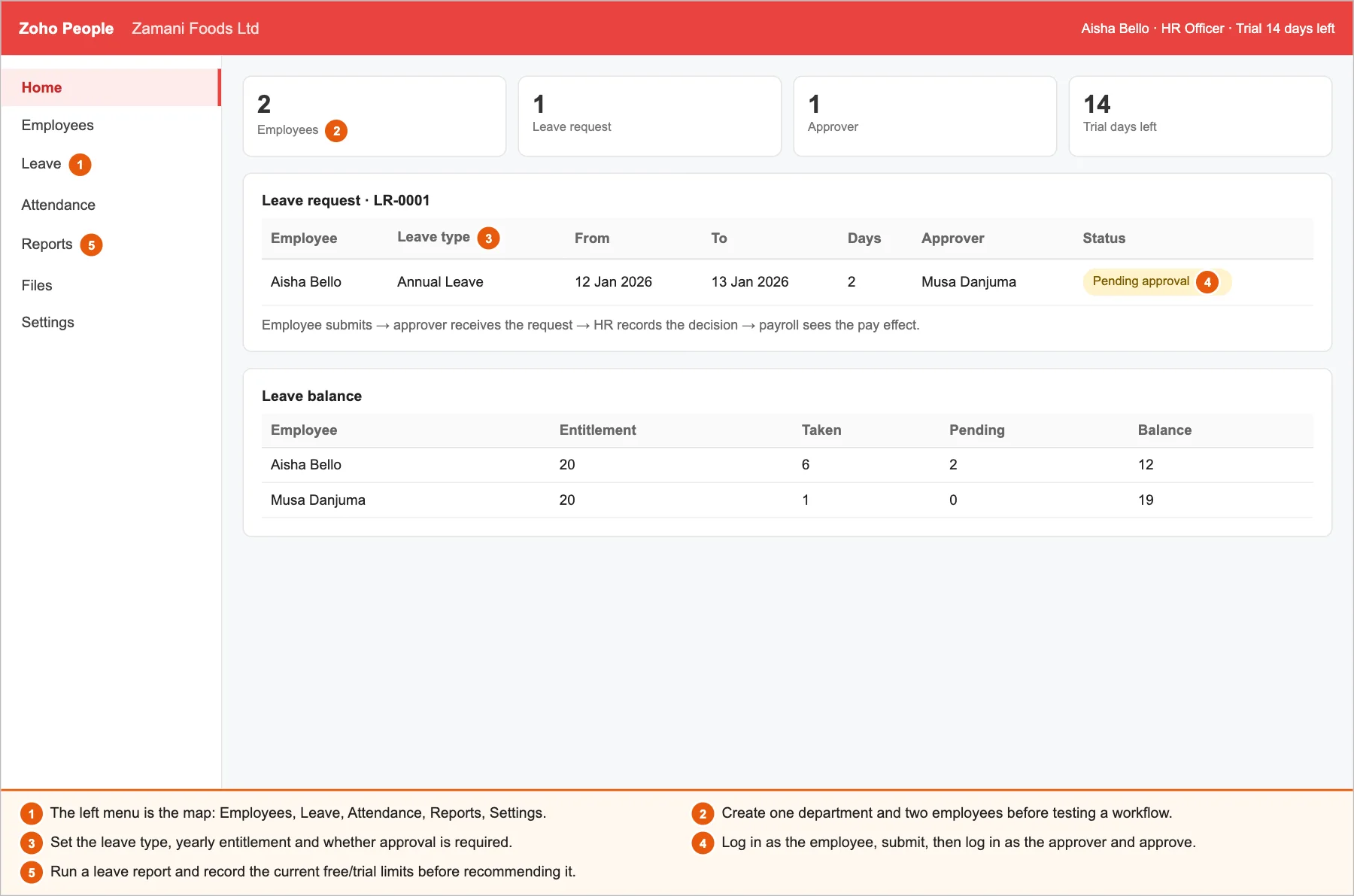
Try it yourself — step by step
- Create the account and set the organisation details.
- Add one department and two employees.
- Set the leave type, entitlement and approval rule.
- Submit a request as the employee, then approve it as the approver.
- Run a leave report and note the trial limits.

Build the prompt from three phrases — Role, Task and Format — and watch the AI answer.
Exploring HR reports
Reports usually include headcount, leave balances, attendance summaries and employee data exports. Run each report and check it against a manual count before sharing. Reports are only as accurate as the data entered. Export a copy for your monthly HR report but protect the file. Avoid giving every manager access to salary or medical data; use role-based permissions and review them regularly.
Free versus paid features
Typical paid features include more employees, advanced workflows, custom reports, payroll integrations, document management and support. Free or trial editions often limit users or modules. Check the official pricing page for current limits; do not rely on an old video or blog. If the free edition does not cover 40 staff, options include a paid plan, using Sheets for the rest of the year, or a different tool with a suitable free tier. State the cost and the exit plan in your recommendation.
Step-by-step: evaluate Zoho People in one hour
1) Write the three HR tasks you most need to digitise. 2) Check the current free/trial limits against your headcount. 3) Create a trial account with fictional data only. 4) Set up one department, two employees, one leave type and one manager. 5) Submit and approve a test leave request. 6) Run a leave report and check it. 7) Record what worked, what needed a paid feature and what data would be hard to migrate. 8) Recommend adopt, trial longer or defer.
Common mistakes to avoid
Common mistakes are importing real staff data into a trial without checking the exit terms, setting up departments by guesswork, leaving all managers with full access, and copying an old blog's free-plan limits. Another mistake is assuming software replaces policy. Test with fictional data, verify current pricing and align the configuration with the approved HR rules.
Practice exercise
Create a fictional free trial account if you can, or use the vendor's demo. Set up one department, two employees, one leave type and one approver. Submit and approve a test request, then run a leave report. Write a one-page recommendation for Zamani Foods stating the current free/trial limits you verified, the cost of a paid plan, and what you would use if the free option is not enough.
Lesson summary
Zoho People centralises employee records, leave and reports. Setup requires an accurate organisation structure and a clear policy. Test with fictional data, verify current free and paid limits, control access and plan for the end of a trial. Software supports HR; it does not replace judgement or policy.
Open ChatGPT (free tier) and paste this prompt there. Explains HR-software concepts and setup steps; follow Zoho's own current help pages.
You are an HR software adviser. Prepare a short evaluation plan for Zoho People at a 40-person Nigerian food company as a checklist covering needs, free/trial limits, test data, access and exit plan.
Why this tool: Explains HR-software concepts and setup steps; follow Zoho's own current help pages.
Hit a free limit? Switch to ChatGPT or Gemini and continue — the prompt works in any assistant.
Answer all three questions and check your answers to unlock the next lesson. Pass mark: 2 of 3.
The first step in setting up HR software is to…
Free editions of HR software usually…
Managers should receive access to…