
HR Productivity and Reporting with AI
Listen to this lesson
Nigerian voice narration
Fictional training case. Fictional case. The end of the month is close. You have an attendance register, a leave tracker, recruitment notes, training attendance and a staff feedback survey. The MD wants a one-page HR report by Friday. You want to use AI for the narrative and the dashboard structure without letting it invent figures.

Introduction and learning objectives
This lesson explains how to use AI to improve HR administration, summarise anonymised employee feedback, prepare recruitment, attendance, performance and training summaries, design simple dashboards with spreadsheet tools, combine AI with HR software and verify AI-generated documents. By the end you should be able to produce a reliable monthly HR report faster.
Using AI to improve HR administration
List the recurring HR tasks that consume time: drafting letters, updating checklists, summarising policies, preparing interview packs and writing reports. For each, decide whether AI can produce a first draft, a checklist or a template. Build a small prompt library with the prompts that work. Do not automate decisions or confidential data handling. The goal is to remove repetitive writing, not to remove professional review.
Summarising employee feedback safely
Anonymise survey comments by removing names, departments and identifying details. Ask AI to group the comments into themes, count how many comments support each theme and provide one short representative quote per theme. Check the counts and the quotes against the source. Be alert to small samples and strong opinions that are not representative. Use the themes to propose actions, but let management decide. Never upload the raw named survey file.
Preparing recruitment reports
A recruitment report covers the role, applications received, source channels, shortlisted, interviewed, offered and hired, plus time-to-fill and any issues. Give AI only aggregate, non-personal figures and ask for a clear structure. Check every number against the tracker. Use the report to improve future adverts and timelines, not to justify a decision after the fact.
Analysing attendance and performance records
AI can suggest formulas and chart choices for attendance and performance data. Apply the formulas in Sheets or Excel and check a sample. For attendance, look at patterns by person, department and day rather than only totals. For performance, use aggregate ratings and agreed KPIs. Do not ask AI to rank individual employees for promotion or discipline. The analysis should inform a human conversation, not replace it.
Generating training and performance summaries
Provide verified attendance, completion and evaluation data. Ask for a summary with participation, cost, completion, evaluation results and recommended next steps. For performance, use aggregate data and avoid individual identifying details unless the report is restricted. Check that the narrative matches the figures. Add the actions agreed with managers and the dates for follow-up.
Creating HR dashboards with spreadsheet tools
A simple dashboard can show headcount by department, leave days by type, attendance rate, recruitment pipeline, training completion and appraisal completion. Build it in Google Sheets or Excel using COUNTIFS and charts or a PivotTable. Keep one page, label the period and source, and use consistent colours. AI can suggest a layout and the formulas, but you must build and verify the sheet. Do not put confidential individual data on a dashboard that managers can open.
Build the prompt from three phrases — Role, Task and Format — and watch the AI answer.
Combining AI with HR software
Use the HR system for records, approvals and reports; use AI for drafting the narrative around verified exports. For example, export a leave summary, check the totals, then ask AI to write a short commentary. Do not paste the full employee export into a public chatbot. Keep the system as the source of truth and AI as a writing assistant. Document which parts of the report were AI-assisted.
Verifying AI-generated HR documents
Check figures against the source, names and dates against the register, legal statements against current authoritative guidance, and tone against the audience. Look for invented policies, missing caveats and biased language. Confirm that no personal data appears where it should not. Have a second person review sensitive reports. Keep the original data, the AI draft and the final approved version so the process can be explained.
Step-by-step: build the monthly HR report
1) Collect verified figures from attendance, leave, recruitment, training and appraisal records. 2) Build a one-page summary sheet with totals and variances. 3) Ask AI for a report structure and a short narrative using only the verified totals. 4) Check every figure against the sheet. 5) Add two findings and three actions with owners and dates. 6) Remove any unnecessary personal data. 7) Have a second person review. 8) Send the report and archive the approved copy.
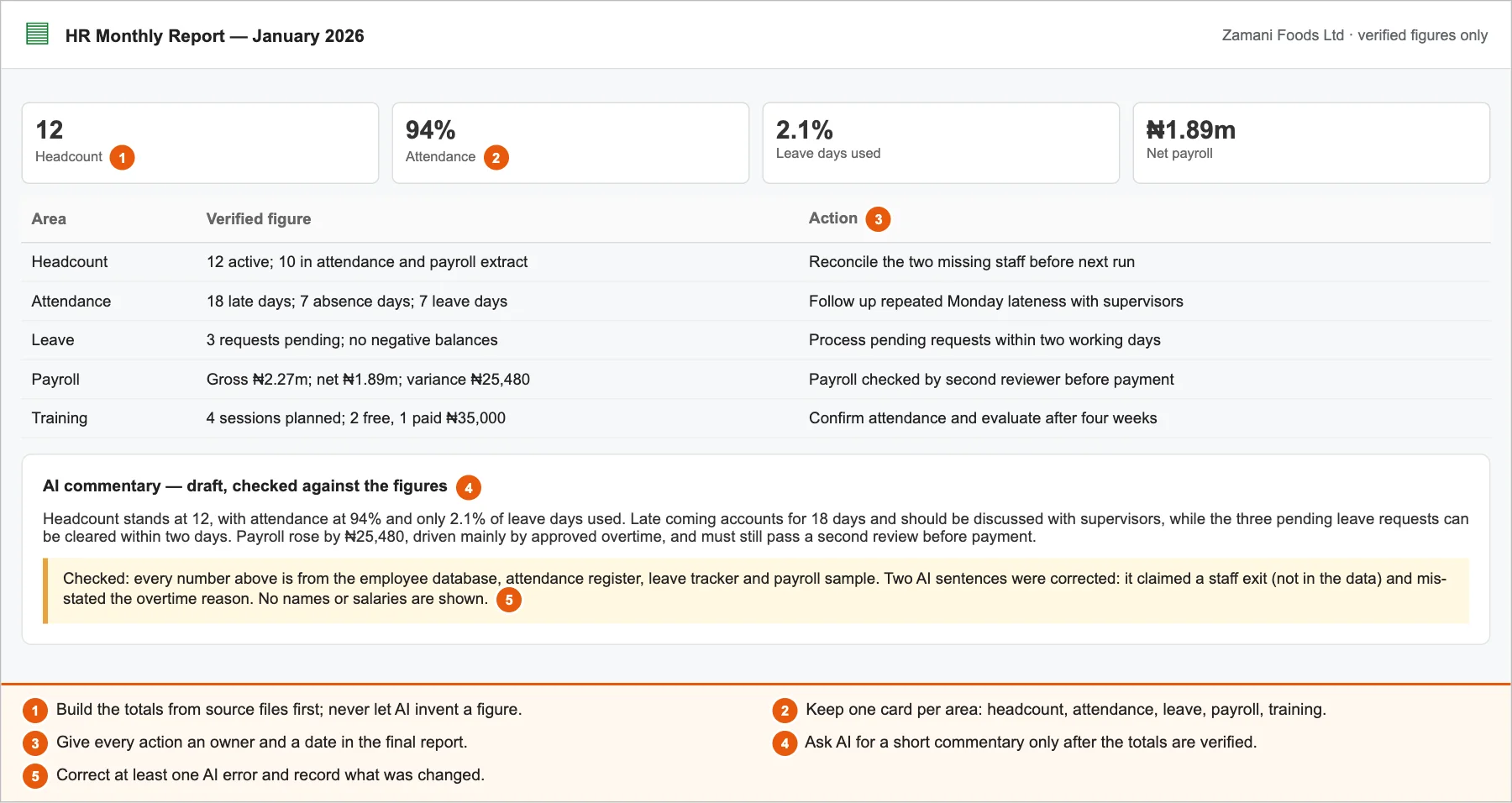
Try it yourself — step by step
- Build totals from the source files before writing anything.
- Keep one card per area: headcount, attendance, leave, payroll, training.
- Give every action an owner and a date.
- Ask AI for a short commentary only after totals are verified.
- Correct at least one AI error and record what changed.
Common mistakes to avoid
Common mistakes are pasting a full staff export into a chatbot, accepting AI's totals without checking, presenting individual performance rankings in a general report, and sending a report with no actions or owners. Another mistake is using a dashboard that shows confidential details to managers who do not need them. Verify figures, protect data and keep reports focused on decisions.
Practice exercise
Using the downloadable anonymised feedback and monthly report template, build a one-page HR report for a fictional month. Include headcount, leave, attendance, recruitment and training figures. Ask AI for a 150-word commentary using only those verified totals, then correct at least two issues. Add two findings and three actions with owners and dates.
Lesson summary
AI can speed up HR administration and report drafting when the inputs are verified and anonymised. Use it for structure and narrative, not for calculating confidential payroll or making people decisions. Build simple dashboards, check every figure, protect personal data and keep a second review for sensitive reports.
Open Google Gemini (free tier) and paste this prompt there. Summarises cleared, anonymised HR feedback and helps shape report wording you verify.
You are an HR reporting assistant. Draft the structure for a one-page monthly HR report using verified attendance, leave, recruitment and training totals with headline figures, two findings, three actions with owners and a data-source note.
Why this tool: Summarises cleared, anonymised HR feedback and helps shape report wording you verify.
Hit a free limit? Switch to ChatGPT or Gemini and continue — the prompt works in any assistant.
Answer all three questions and check your answers to unlock the next lesson. Pass mark: 2 of 3.
Before asking AI to summarise staff feedback, you should…
A useful monthly HR report should include…
The source of truth for HR records remains…