
Practical AI Applications in HR
Listen to this lesson
Nigerian voice narration
Fictional training case. Fictional case. It is a busy week at Kowa Microfinance: a new role must be advertised, the staff handbook needs updating, three new staff resume on Monday, and the MD wants a training plan. You have ChatGPT and Gemini on free tiers. Your task is to produce useful first drafts quickly, then verify and finish them yourself.

Introduction and learning objectives
This lesson walks through practical AI applications in HR: job descriptions, interview questions, policies and handbooks, onboarding plans, employee emails and notices, performance review templates, training plans, HR reports and basic analysis. Each section includes what to give the AI, what to check and what must remain human. By the end you should have a repeatable workflow for HR drafting.
Creating job descriptions with AI
Give the AI the title, department, purpose, main duties, essential and desirable requirements, location and contract type. Ask for a description with a purpose statement, duties, person specification and measurable performance indicators. Ask it to flag assumptions. Remove duties that are not real, requirements that are not job-related and any invented salary or benefit. Compare the final version with the approved staffing request.
Generating interview questions
Paste the person specification and ask for structured questions that test each essential criterion, with a scoring guide. Request behavioural and situational questions. Check that every question is lawful and job-related, remove anything about family, religion, age, ethnicity or disability, and ensure all candidates get the same core questions. The panel must approve the final set and own the scores.
Drafting HR policies and employee handbooks
AI can turn a list of topics into a readable policy structure: purpose, scope, rules, procedure, responsibilities and review date. It can also produce a plain-language staff summary and a manager checklist. It cannot decide what is lawful or appropriate for your organisation. Verify legal statements against current Nigerian sources, align the policy with existing contracts and get management approval. Never copy a generic policy without local review.
Preparing onboarding plans
Give the role, start date, department, tools and key contacts. Ask for a before-day-one, week-one and month-one plan with owners. Ask for a welcome email and a first-week schedule. Check that the plan matches your real systems and that no access or document is assumed. Add local details such as power backup, transport or security arrangements where relevant. Test the plan with the supervisor before the new person arrives.
Drafting employee emails and notices
AI is useful for routine messages: interview invitations, document requests, leave decisions, reminders, meeting notices and policy announcements. Provide the facts, the audience and the tone. Ask for a short version for WhatsApp if needed. Check dates, names, amounts and attachments. Do not include personal details that the recipient should not see. For sensitive matters such as discipline or redundancy, use careful human drafting and legal review.
Preparing performance review templates
Ask for an appraisal form with goals, competencies, evidence, employee comments, rating definitions and development actions. Adapt the competencies to your organisation and keep the form short enough to complete honestly. AI can also suggest review questions for managers. It cannot rate an employee. Do not paste real performance data into a public tool; use fictional examples when testing the template.

Build the prompt from three phrases — Role, Task and Format — and watch the AI answer.
Creating staff training plans and HR reports
Give AI the verified needs, audience, budget and available time. Ask for a plan with objectives, methods, dates, cost and success measures. For reports, provide the verified figures and ask for a clear structure: headline, findings, actions. Check every number and recommendation. AI can suggest wording, but the report must reflect your data and judgement. Keep a copy of the prompts and sources used.
Analysing sample HR data safely
AI can suggest formulas, chart choices and themes in anonymised comments. It should not be trusted to calculate payroll or make final performance judgements. Use anonymised or fictional datasets. Ask for the method, then apply it in Sheets or Excel and check the totals. For survey comments, ask for themes with counts and representative quotes, then verify each quote against the source. Protect the raw data.
A verification checklist for every AI draft
Before using any output, check: Are the facts correct? Are names, dates and amounts right? Is the legal or policy statement current and applicable? Is the tone appropriate? Is any personal data included? Is the output biased or stereotyped? Does it match the approved process? Who will sign it off? Record the answers. A two-minute check prevents most AI-related embarrassment.
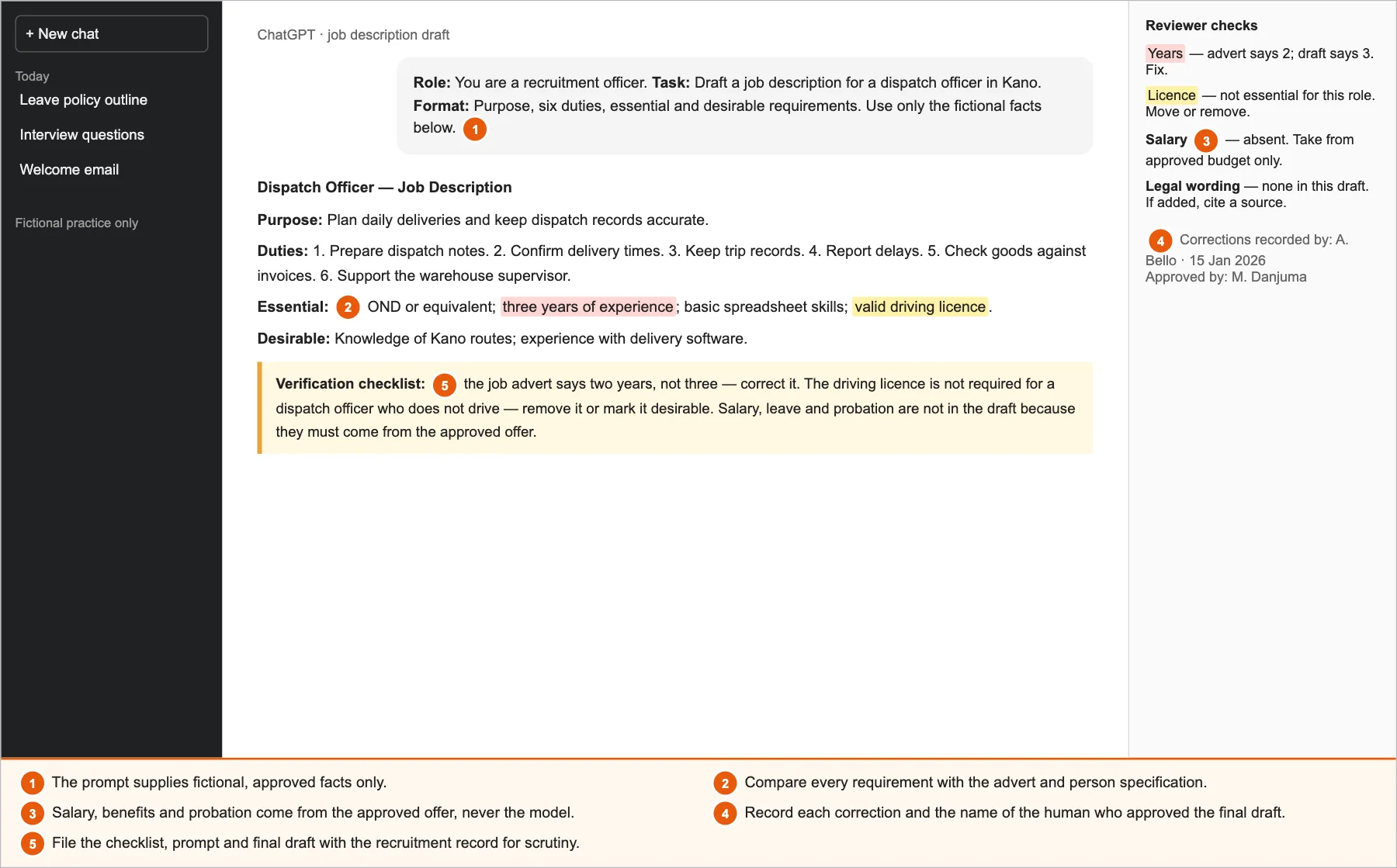
Try it yourself — step by step
- Supply only fictional, approved facts in the prompt.
- Compare every requirement with the advert and person specification.
- Take salary, benefits and probation from the approved offer.
- Record each correction and the approving human's name.
- File the checklist, prompt and final draft with the recruitment record.
Common mistakes to avoid
Common mistakes are publishing an AI draft without reading it, leaving invented legal references in a policy, using real staff data in prompts, and assuming AI's interview questions are automatically fair. Another mistake is letting AI write sensitive messages such as termination or redundancy notices without human and legal review. Draft with AI, then verify, edit and approve.
Practice exercise
Choose two tasks from this lesson. Write the Role–Task–Format prompt, produce a draft with fictional facts, then mark at least five changes you had to make. For one policy or legal statement, record the authoritative source or qualified person you would check before approval. Add the final verification checklist to your HR templates folder.
Lesson summary
AI is useful for HR drafting: job descriptions, questions, policies, onboarding, emails, review forms, training plans and report structures. Give clear facts, use fictional or anonymised data, verify every legal and factual point and keep sensitive decisions human. A verification checklist makes AI use safer and faster.
Open ChatGPT (free tier) and paste this prompt there. Strong all-round drafting for the many HR documents in this module.
You are an HR officer drafting with AI. Create a one-page onboarding plan for a new administrative officer using fictional facts as before-day-one, week-one and month-one checklists with owners, plus a verification note.
Why this tool: Strong all-round drafting for the many HR documents in this module.
Hit a free limit? Switch to ChatGPT or Gemini and continue — the prompt works in any assistant.
Answer all three questions and check your answers to unlock the next lesson. Pass mark: 2 of 3.
AI-generated interview questions should be checked for…
When asking AI to analyse employee feedback, you should use…
A good verification step for an AI report is to…