
Introduction to AI in HR
Listen to this lesson
Nigerian voice narration
Fictional training case. Fictional case. The Managing Director of Zamani Foods has read about AI and tells you to 'start using it for HR'. There is no AI policy, no approved tool list and no guidance on staff data. You need a safe starting point that saves time without putting confidential records into a public chatbot.

Introduction and learning objectives
This lesson explains what AI chat tools are, how they are changing HR work, how to set up free ChatGPT and Gemini accounts, how to write an effective Role–Task–Format prompt, and the benefits, limitations and ethical rules for HR. By the end you should be able to use AI for low-risk drafting while protecting employee data and keeping human judgement in charge.
What artificial intelligence means for HR
In everyday HR work, AI usually means a large language model such as ChatGPT or Gemini: a chat tool that can draft, summarise, rewrite, explain and suggest. It predicts likely text from patterns in its training data. It does not know your organisation, verify facts or understand a person's situation unless you supply the information. Think of it as a fast assistant with no institutional memory and no accountability. You remain the HR professional.
How AI is changing human resource management
AI is used to draft job descriptions, adverts, policies, letters and training outlines; summarise feedback; generate interview questions; analyse anonymous survey comments; and produce first versions of reports. It shortens the blank-page stage and helps small HR teams cover more work. It does not remove the need for policy, fair process, confidentiality or professional judgement. The organisations that benefit most use AI for drafts and use people for decisions.
Setting up ChatGPT and Gemini on free tiers
Visit the official ChatGPT website or app and follow an available free sign-up method. Use an account permitted by your organisation and enable two-step verification. Open Gemini at gemini.google.com with an eligible Google account. Free limits on messages, uploads and features change; read the displayed notice rather than assuming a reset time. Decline paid upgrades for these exercises. If one tool reaches a limit, continue with the other using the same cleared text.
Writing effective HR prompts with Role–Task–Format
A useful prompt names the Role ('You are an HR officer in a Nigerian food distribution company'), the Task ('Draft a one-page leave policy for 40 staff') and the Format ('with purpose, scope, five rules, approval steps and a review date'). Add the facts the model needs and state what it must not invent. Ask for a plain-language version and a checklist. Short, specific prompts produce better drafts than vague instructions.
Benefits of AI in HR
AI can reduce routine writing time, improve consistency, suggest options you had not considered, adapt documents for different audiences and help a one-person HR office produce professional materials. It can turn a long policy into a staff summary or a set of quiz questions. It is available on free tiers and works on a phone. The benefit is speed and structure, not authority: every output still needs review.
Build the prompt from three phrases — Role, Task and Format — and watch the AI answer.
Limitations and risks of AI in HR
AI can invent facts, misstate the law, repeat bias, misunderstand Nigerian context and produce confident but wrong advice. It may use outdated information about tax, employment rules or software. Public tools may store what you paste; confidential employee data must never be entered without authorisation and a lawful basis. Uploaded files can contain hidden personal data. AI can also create automation bias: people accept a polished answer without checking it.
Responsible and ethical AI use in HR
Set clear rules: use approved tools, never paste real salary, medical, disciplinary or identity data, use fictional or anonymised examples, verify every legal or factual statement, keep a human decision-maker for hiring, discipline and pay, and record where AI was used. Check outputs for bias and fairness. Tell staff how AI is used in decisions that affect them. AI must support HR professionals, not replace human judgement or accountability.
Step-by-step: a safe first AI task
1) Choose a low-risk task such as a generic leave-policy outline. 2) Write the Role, Task and Format. 3) Add only fictional facts. 4) Ask for a draft and a list of assumptions. 5) Check the assumptions. 6) Compare legal and policy statements with current authoritative sources or a qualified professional. 7) Edit the draft in your own words. 8) Save the final version in the approved HR folder and note that AI assisted the first draft.
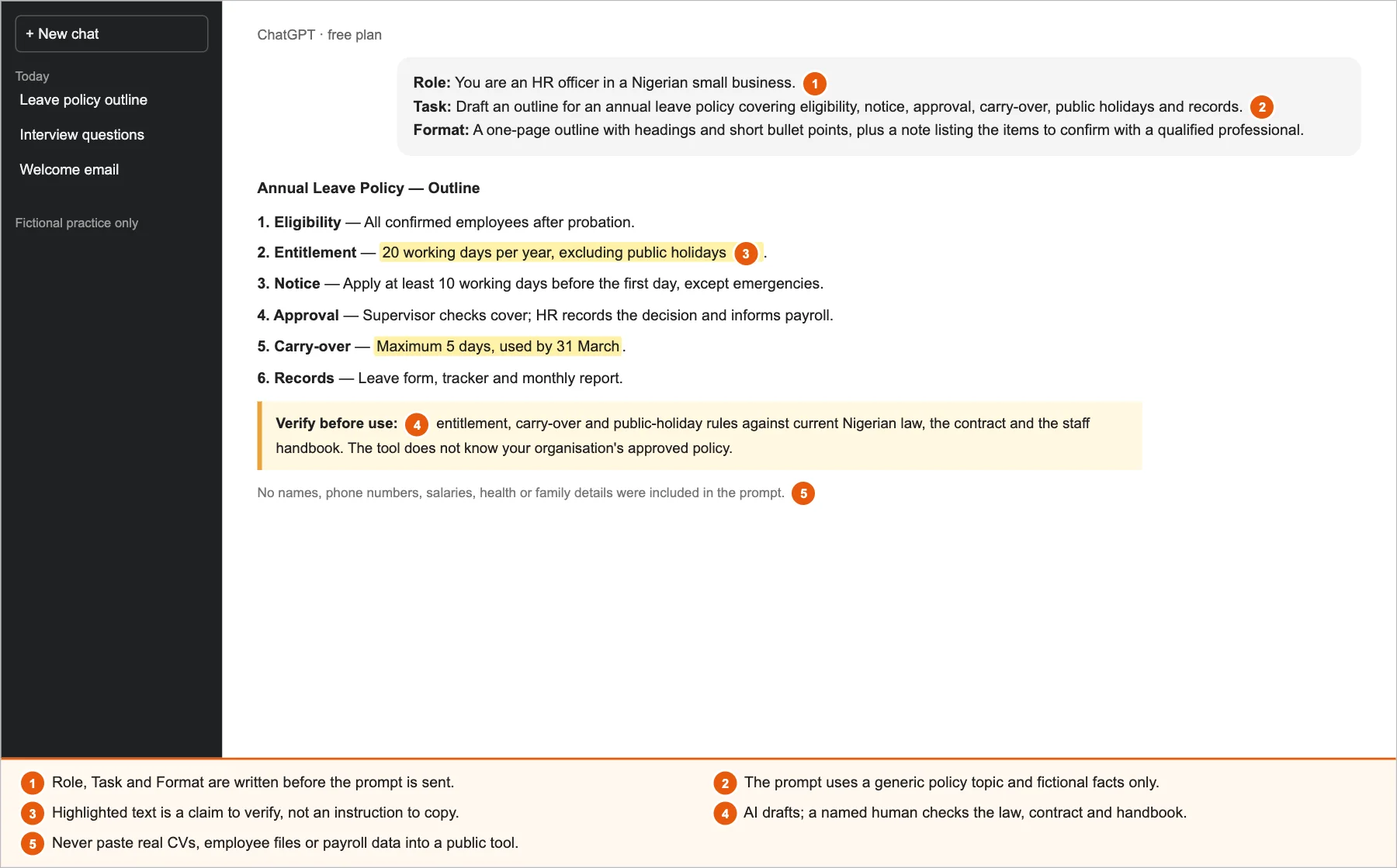
Try it yourself — step by step
- Write Role, Task and Format before sending the prompt.
- Use a generic policy topic and fictional facts only.
- Treat highlighted claims as items to verify, not copy.
- Check entitlement and carry-over against current law and the handbook.
- Never paste real CVs, employee files or payroll data into a public tool.
Common mistakes to avoid
Common mistakes are pasting a real staff list into a public chatbot, trusting AI's legal or tax statements, using an output without reading it, and hiding AI use from management. Another mistake is assuming a free plan is unlimited or that a different tool removes confidentiality rules. Use fictional data, verify, edit and document.
Practice exercise
Write three Role–Task–Format prompts for low-risk HR tasks: a generic leave-policy outline, a welcome-email template and five interview questions for a fictional role. Run one in ChatGPT or Gemini if available. Mark every sentence you would need to verify and list two pieces of information you must never include in a public prompt.
Lesson summary
AI chat tools can speed up HR drafting and summarising on free tiers. Use clear Role–Task–Format prompts, fictional or anonymised data and human review. Verify facts, law and figures. Never upload confidential employee information without authorisation. AI supports HR; people remain accountable.
Open ChatGPT (free tier) and paste this prompt there. A friendly starting point for safe, effective HR prompting on free tiers.
You are an HR officer learning to use AI safely. Draft a generic onboarding checklist for a Nigerian office using fictional facts with before-day-one, week-one and month-one sections, plus a verification note.
Why this tool: A friendly starting point for safe, effective HR prompting on free tiers.
Hit a free limit? Switch to ChatGPT or Gemini and continue — the prompt works in any assistant.
Answer all three questions and check your answers to unlock the next lesson. Pass mark: 2 of 3.
The three parts of a Role–Task–Format prompt are…
AI gives a policy draft citing a law you do not recognise. You should…
Who is accountable for an HR decision assisted by AI?