
Attendance, Leave and Time Management
Listen to this lesson
Nigerian voice narration
Fictional training case. Fictional case. Bashir & Sons Logistics still uses paper attendance registers. Three staff dispute deductions, leave requests arrive by WhatsApp, and the monthly attendance report is always late. The operations manager wants a reliable record and a fair leave process before the next payroll run.

Introduction and learning objectives
This lesson explains attendance records, how to design a register, working hours, lateness, absence, overtime, the main types of leave, application and approval procedures, a leave tracker, monthly attendance reports and digital tools. By the end you should be able to run a simple, fair and accurate attendance and leave system using free tools.
Understanding employee attendance
Attendance records show who was at work, when, and why they were absent. They support payroll, performance, safety, client billing and legal compliance. A good record is complete, timely, consistent and agreed by the employee and supervisor. Paper registers work only if they are completed daily and stored safely. Digital registers reduce disputes because entries are time-stamped and can be summarised. Whatever the tool, the rule must be the same for everyone.
Designing an attendance register
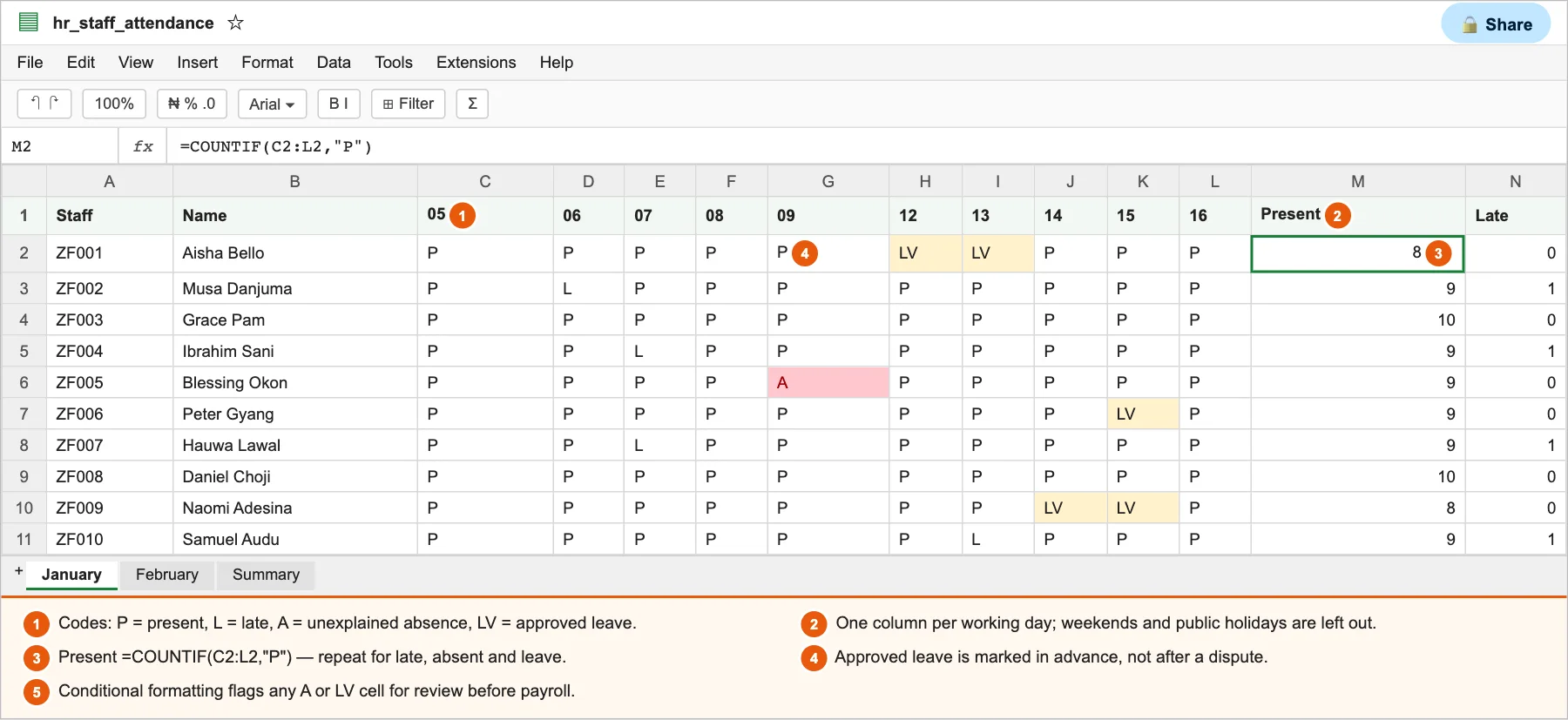
A register needs a date, staff number, name, department, expected time, clock-in, clock-out, hours worked, status (present, late, absent, leave, official duty), and a supervisor's initials. Use one row per employee per day and keep a monthly sheet. Mark approved leave in advance and require evidence for absence. Add a summary section for days present, late, absent and on leave. Protect the sheet from unauthorised edits and back it up.
Try it yourself — step by step
- Open hr_staff_attendance.csv and keep one column per working day.
- Enter P, L, A or LV in each cell.
- In Present type =COUNTIF(C2:L2,"P") and copy down.
- Add separate COUNTIF totals for late, absent and leave.
- Use conditional formatting to flag A or LV before payroll.
Working hours, lateness and absence
State the official hours in the contract or staff handbook, including break times and any shift pattern. Define lateness and unauthorised absence clearly. Apply the same threshold to everyone, including senior staff. Record the reason and any approval. Repeated lateness may need counselling or a performance plan rather than an immediate penalty. Unauthorised absence should be followed up promptly in writing. Keep the records factual and avoid public shaming.
Overtime, rest and time records
Overtime is work beyond agreed hours. Check the contract, collective agreement and current Nigerian rules before promising or refusing payment; rates and eligibility vary. Record approved overtime in advance, with the reason, hours and approver. Ensure staff get required rest periods and that overtime does not become a hidden way to cover understaffing. Review overtime trends monthly: a persistent pattern may indicate a workload or staffing problem rather than individual enthusiasm.
Types of employee leave
Common leave types include annual leave, sick leave, maternity leave, compassionate leave, study leave, public holidays and any organisation-specific leave. The contract, handbook and current Nigerian law set the minimums and conditions. Some leave is paid and some may be unpaid. Keep a written leave policy that explains eligibility, notice, documentation, approval and carry-over. Do not invent rules verbally: staff should be able to read the same rule you apply.
Leave application and approval
Use a simple form or Google Form that captures the employee, leave type, dates, days requested, reason where appropriate, handover arrangement and approver. Require notice except in emergencies. The supervisor checks coverage and approves or declines with a reason. HR records the decision, updates the tracker and informs payroll if the leave affects pay. The employee should receive a written response. Keep medical or family details confidential and share only what payroll needs.

Build the prompt from three phrases — Role, Task and Format — and watch the AI answer.
Leave tracker with formulas
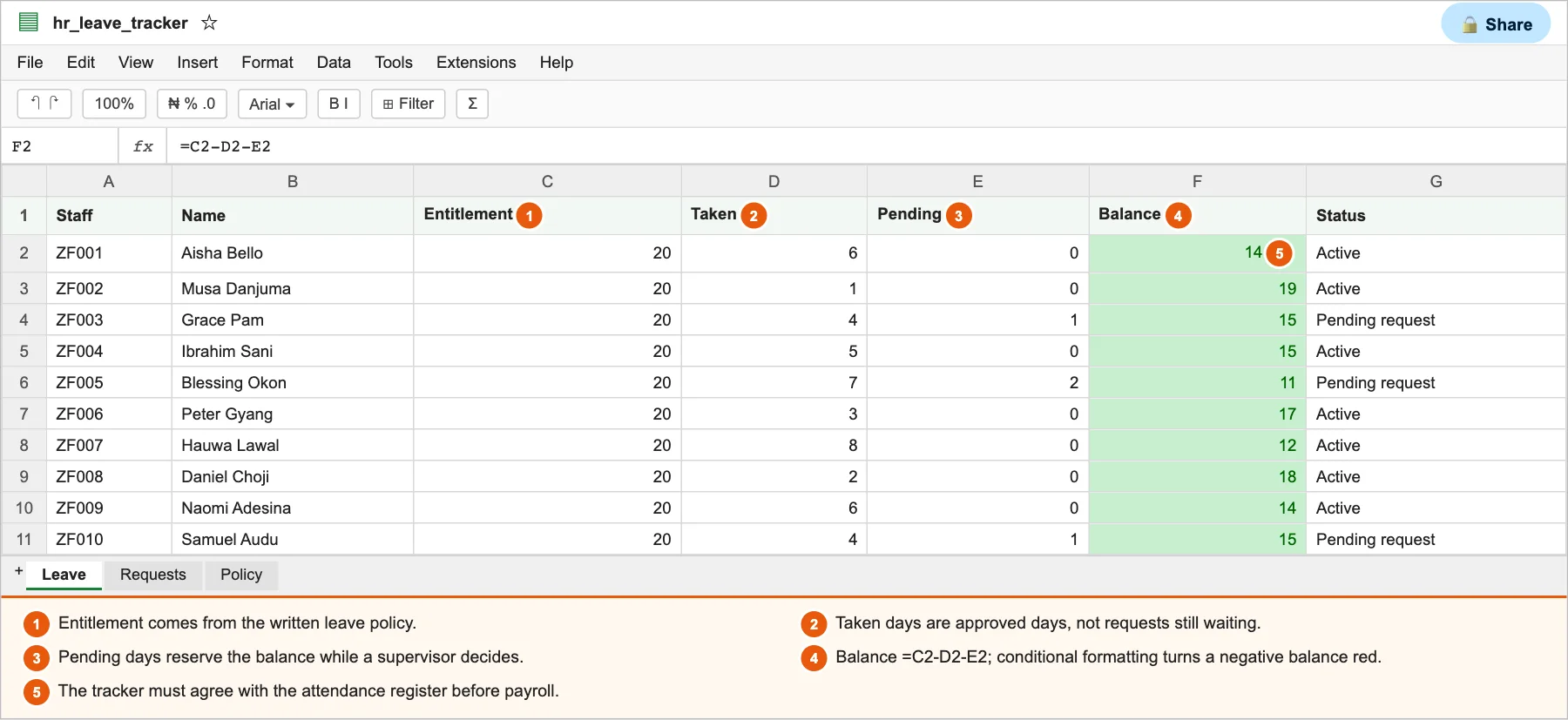
A leave tracker lists each employee, entitlement, days taken, days pending, balance and dates. Use formulas such as =Entitlement-DaysTaken-Pending to show the balance and conditional formatting to flag negative balances. Add a status column (pending, approved, declined, cancelled). Calculate working days carefully, excluding weekends and public holidays. Protect formula columns. Reconcile the tracker with payroll deductions and the attendance register at the end of each month.
Try it yourself — step by step
- Open hr_leave_tracker.csv and copy entitlement from the written policy.
- Record only approved leave as Taken; pending days sit separately.
- In Balance type =C2-D2-E2 and copy down.
- Turn negative balances red with conditional formatting.
- Reconcile the tracker with the attendance register before payroll.
Preparing monthly attendance reports
A monthly report summarises days present, late, absent and on leave by employee and department. Add the reasons for significant absence, overtime hours and any unresolved disputes. Use COUNTIFS in Sheets or Excel to build the summary, then check a sample against the daily entries. Send the report to management and payroll by an agreed date. Keep a copy with the month and year in the file name. A clear report turns a pile of registers into a management tool.
Digital tools for attendance and leave
Google Forms plus Sheets is a free starting point: staff submit leave, HR reviews and the tracker updates. Zoho People and OrangeHRM offer employee self-service, approval flows and reports on free or trial plans, but check current limits. A biometric or card system improves accuracy but needs reliable power, maintenance and a clear privacy policy. Choose the simplest tool that fits the size and budget of the organisation, and train staff before switching.
Common mistakes to avoid
Common mistakes are marking attendance at the end of the month, applying deductions without evidence, allowing verbal leave approvals that never reach HR, ignoring public holidays in day counts, and keeping medical reasons in a shared sheet. Another mistake is treating a leave balance as a suggestion. Document requests, approvals and calculations, and reconcile the tracker before payroll.
Practice exercise
Using the downloadable attendance register and leave tracker, complete one fictional month for ten staff. Mark present, late, absent and leave days, add two leave requests and calculate each person's balance. Then write three COUNTIFS formulas for the monthly summary and identify one attendance irregularity you would investigate.
Lesson summary
Attendance and leave records support fair pay and performance decisions. Use a consistent register, a written leave policy, a formula-based tracker and a monthly report. Record approvals and evidence. Protect sensitive details. Reconcile everything before payroll.
Open Google Gemini (free tier) and paste this prompt there. Suggests attendance and leave formulas you test in your own sheet.
You are an HR administrator. Design a monthly attendance and leave summary for a 10-person office as a table of columns plus three formulas and a two-line explanation of the approval flow.
Why this tool: Suggests attendance and leave formulas you test in your own sheet.
Hit a free limit? Switch to ChatGPT or Gemini and continue — the prompt works in any assistant.
Answer all three questions and check your answers to unlock the next lesson. Pass mark: 2 of 3.
A leave tracker balance is best calculated with…
Overtime rules should be checked against…
A monthly attendance report should be checked by…