
Employee Records and Documentation
Listen to this lesson
Nigerian voice narration
Fictional training case. Fictional case. Zamani Foods Ltd has staff files in cartons, some records on a former officer's phone and a spreadsheet that only one person understands. A bank requests employment confirmation for a staff member, an auditor asks for a contract, and the MD wants a reliable staff list by Friday. You must bring the records under control without losing or exposing personal data.

Introduction and learning objectives
This lesson explains which employee records to keep, how to design an employee information form and staff database, which employment documents belong on file, how to manage physical and digital files, update records, retain them safely and protect confidentiality. By the end you should be able to build a clean staff register and a filing routine that others can follow.
Understanding employee records
Employee records are the documents and data an organisation needs to manage a person's employment: identity, contact details, contract, qualifications, role history, pay inputs, attendance, leave, training, performance and exit. Keep only what has a lawful purpose. Records support payroll accuracy, legal compliance, performance decisions and emergency contact. They also carry risk: a lost file or a leaked salary sheet can harm the employee and expose the organisation. Accuracy, access control and retention rules matter.
Employee information form fields
A good employee information form collects: full name, staff number, date of birth, gender where legally needed, contact address, phone, personal email, emergency contact, next of kin, bank details for payroll, tax identification, pension number, qualifications, previous employment, start date, department, role, contract type and signed declarations. Explain why each sensitive field is needed and who will see it. Do not collect religion, ethnicity or health information unless there is a specific lawful reason and a secure process.
Designing a staff database
A staff database is a controlled table with one row per employee and consistent columns. Separate tabs for personal details, employment history, leave, training and payroll inputs keep the main list readable. Use a unique staff number, data validation for departments and status, and formulas for length of service. Protect formula columns and restrict editing. Do not use the main database for interview notes or medical details. A clean database answers basic questions in seconds and reduces duplicate records.
Employment documentation
A complete staff file usually contains the application, CV, credentials, identity document, signed contract, job description, appointment letter, tax and pension forms, bank details, emergency contact, signed policy acknowledgements, probation confirmation and any disciplinary or training records. Keep originals only where required; otherwise keep verified copies and return originals. Log every document received. Missing documents should be flagged and followed up, not quietly ignored.
Managing staff files and naming
Use one folder per employee named with the staff number and surname, for example ZF-014_Bello_Aisha. Inside, use consistent subfolders: 01_Contract, 02_Identity, 03_Qualifications, 04_Payroll, 05_Leave, 06_Performance, 07_Exit. For paper files, use a locked cabinet with a simple sign-out log. For digital files, store them in an approved drive with access limited to HR. Rename files with a date and description so a colleague can find them without opening everything.

Build the prompt from three phrases — Role, Task and Format — and watch the AI answer.
Record updates and retention
Update records when details change: marriage, address, bank account, dependants, qualifications, role, salary or status. Ask staff to confirm key details annually. Keep a change log showing what changed, when, by whom and the supporting document. Retain records only as long as policy and law require; payroll and contract records usually need longer retention than unsuccessful applications. When records expire, dispose of them securely and record the disposal. Do not keep old paper files in open corridors.
Confidentiality and secure record management
Apply need-to-know access: HR sees the full file, a supervisor sees only what the role requires, and other staff see nothing personal. Use strong passwords, two-step verification, restricted sharing and encrypted drives where available. Never send bulk staff data to a personal email or WhatsApp group. Under the Nigeria Data Protection Act 2023, personal data must be protected and breaches handled responsibly. Train staff on the rules, review access regularly and have a simple process for reporting a suspected leak.
Step-by-step: build the staff database
1) List the fields you need and confirm the lawful purpose of each. 2) Create a Google Sheet or Excel workbook with a main staff list and separate tabs for history and documents. 3) Add data validation for department and status. 4) Enter staff from signed forms, not memory. 5) Check duplicates and missing fields. 6) Add a formula for length of service. 7) Restrict editing to HR and share a view-only summary with management. 8) Back up the file and record the backup date.
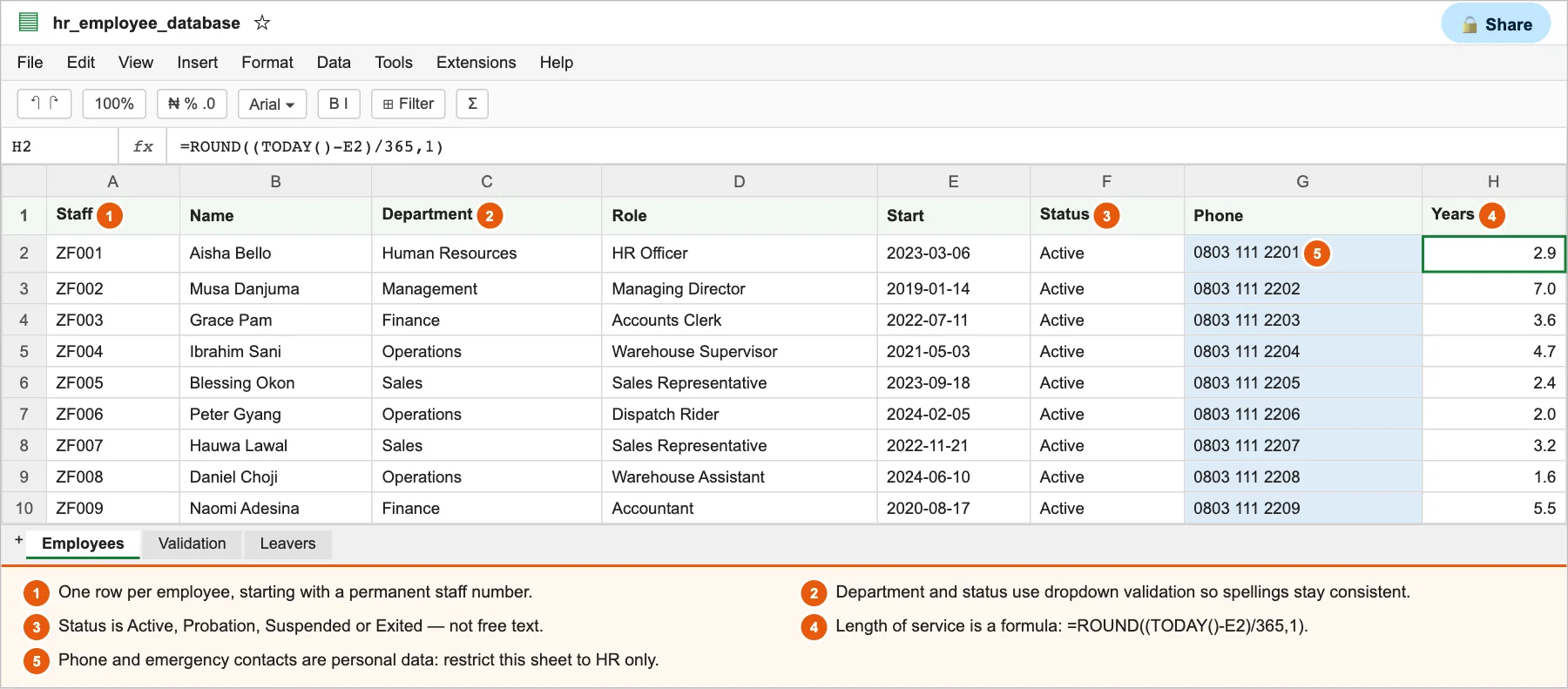
Try it yourself — step by step
- Open hr_employee_database.csv; keep one row per employee.
- Start with a permanent staff number, never a name.
- Add dropdown validation for department and status.
- In Years type =ROUND((TODAY()-E2)/365,1) and copy down.
- Restrict phone and emergency contacts to HR only.
Common mistakes to avoid
Common mistakes are keeping the only staff list on one officer's phone, using duplicate spreadsheets that disagree, storing salary data in a shared folder open to everyone, collecting sensitive data without a reason, and failing to log documents received. Another mistake is deleting records too early or keeping them forever. Use one master source, controlled access and a documented retention rule.
Practice exercise
Using the downloadable employee database template, create a fictional 12-person staff register for Zamani Foods Ltd. Include staff number, name, department, role, start date, status, phone, emergency contact and length of service. Add validation for department and status. List five documents you would expect in one employee's file and one record you would not collect without a specific lawful reason.
Lesson summary
Keep complete, accurate and lawfully collected employee records. Use an information form, a controlled staff database and a consistent folder structure. Log updates and retention. Restrict access and protect personal data. One master record prevents duplication and disputes.
Open Google Gemini (free tier) and paste this prompt there. Helps design a clean staff-database structure in Sheets without exposing real employee data.
You are an HR records adviser. Design a staff database structure and a document checklist for a 45-person Nigerian food company as a table of tabs and fields, then a checklist of documents per employee.
Why this tool: Helps design a clean staff-database structure in Sheets without exposing real employee data.
Hit a free limit? Switch to ChatGPT or Gemini and continue — the prompt works in any assistant.
Answer all three questions and check your answers to unlock the next lesson. Pass mark: 2 of 3.
The best source of truth for staff records is…
A supervisor asks for a staff member's medical record. HR should…
Records that are no longer needed should be…