
Formulas and the five essential functions
Listen to this lesson
Nigerian voice narration
Fictional training case. Month-end: the accounts unit wants total expenditure, average voucher value, the largest and smallest single payments, and the number of vouchers processed. You could add 90 rows with a calculator — or write five formulas in two minutes and reuse them every month. This lesson teaches the five functions that do most office arithmetic.

How formulas work
Every formula starts with = and refers to cells, not typed numbers: =B2+C2. When the data changes, the result updates. Cell references are why spreadsheets beat calculators — the calculation is wired to the data.
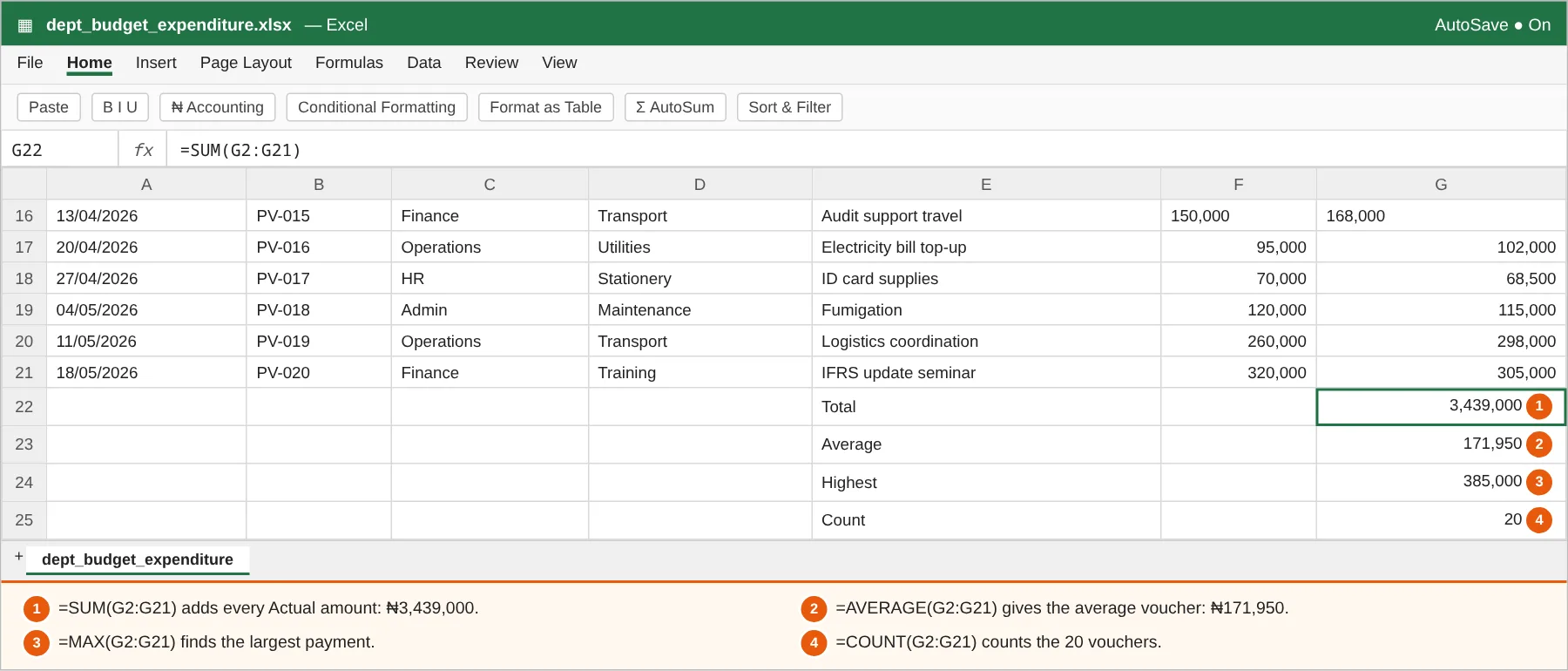
Try it yourself — step by step
- Click the empty cell under the Actual column (G22).
- Type =SUM(G2:G21) and press Enter for the total.
- In the next cells type =AVERAGE(G2:G21), =MAX(G2:G21) and =COUNT(G2:G21).
- Check the total matches the PivotTable Grand Total later in the course.
SUM and AVERAGE
=SUM(G2:G91) adds the Actual column; =AVERAGE(G2:G91) gives the mean voucher value. In an Excel Table you can write =SUM(Expenditure[Actual]) — a structured reference that grows with the data and reads like English.
MIN, MAX and COUNT
=MIN(range) and =MAX(range) find the smallest and largest payments — useful for spotting data-entry errors like a ₦50 voucher that should be ₦50,000. =COUNT(range) counts numeric cells; =COUNTA(range) counts non-empty cells, handy for counting vouchers by their numbers.

Build the prompt from three phrases — Role, Task and Format — and watch the AI answer.
Build a small summary block
Put labels in column I (Total spend, Average voucher, Largest, Smallest, Voucher count) and the five formulas in column J. This summary block becomes the top of your monthly report — management reads totals first, detail later.
Common mistakes to avoid
The classic error is typing numbers into formulas — =5000+12000 — instead of cell references, so the formula never updates when data changes. Another is selecting the wrong range and not noticing, which is why you verify one result by hand. A third is using COUNT on a text column and getting zero, then concluding there are no records; COUNT counts numbers only, COUNTA counts any non-empty cell.
Your practice
On the sample expenditure file, write the five formulas in a summary block. Then change one amount and watch every result update. That live link between data and answers is the whole point of spreadsheets. Finish by saving the file with today's date in the name — this summary block is the beginning of your monthly report template.
You are an Excel expert. Give me the five formulas for total, average, largest, smallest and count of an Amount column in an Excel Table called Expenditure, using structured references, with a one-line explanation each.
Answer all three questions and check your answers to unlock the next lesson. Pass mark: 2 of 3.
=COUNTA(A2:A91) counts…
A voucher of ₦50 that should be ₦50,000 would be caught quickest by…
=SUM(Expenditure[Actual]) is called…