
Excel: lookups, trial balance, reconciliation and audit working papers
Listen to this lesson
Nigerian voice narration
Fictional training case. The internal audit unit of a Benue State agency receives a 1,200-row payment listing and a separate supplier master file. The head of audit wants supplier names matched to bank details, a trial balance rebuilt from the ledger export, and a working paper that documents every test. This lesson shows the Excel techniques that make this manageable.

Introduction and objectives
This lesson extends your Excel skills into reconciliation and audit work: VLOOKUP and XLOOKUP for matching records, a self-checking trial balance, a bank reconciliation layout and standard audit working papers. By the end you should be able to link datasets and document audit tests in Excel.
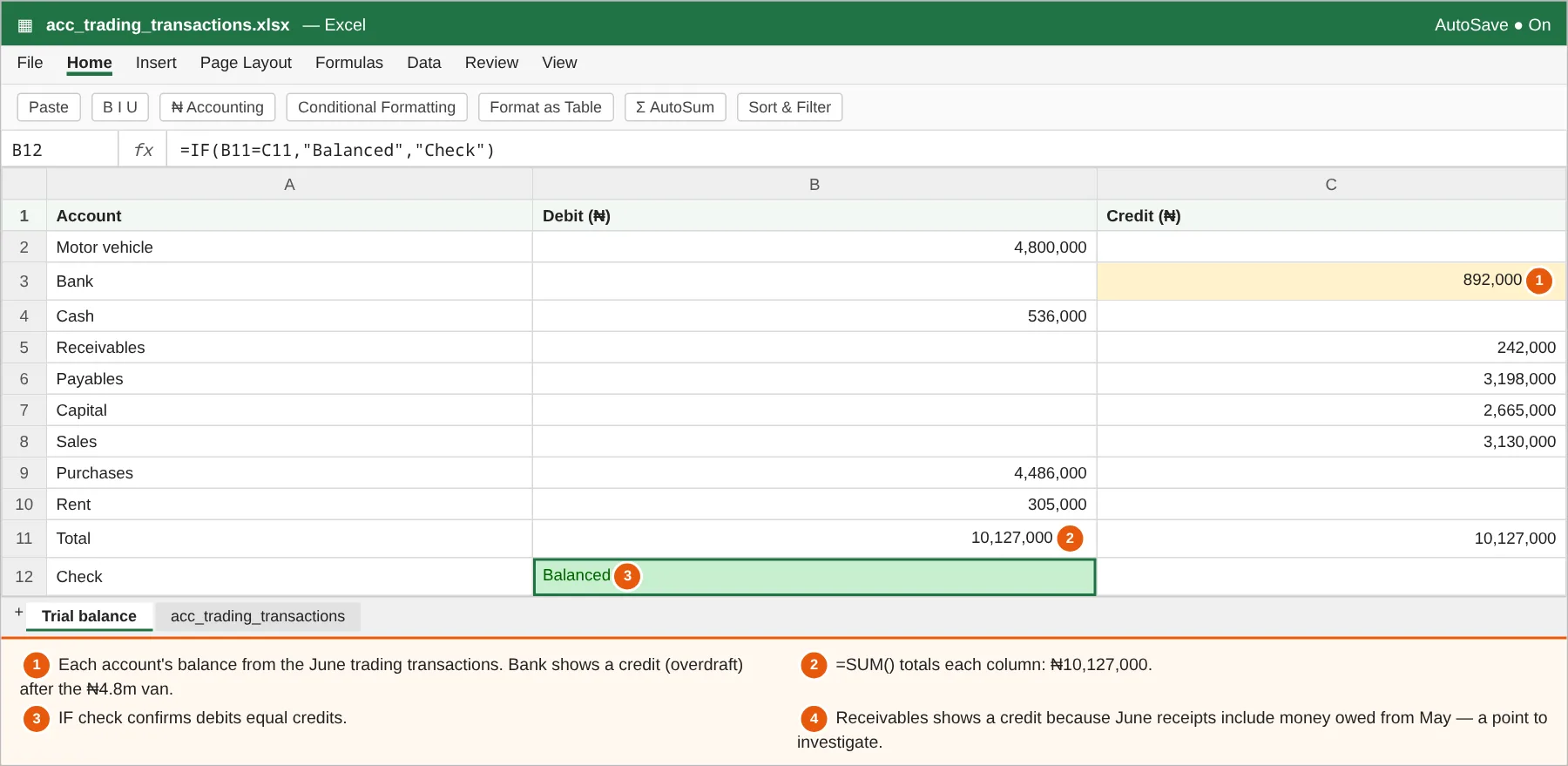
Try it yourself — step by step
- Post the June trading transactions and list each account balance.
- Total the Debit column with =SUM().
- Total the Credit column with =SUM().
- Add a check: =IF(debit_total=credit_total,"Balanced","Check").
VLOOKUP and XLOOKUP
To bring a supplier's registered account number into a payment list: =XLOOKUP([@SupplierID],tblSuppliers[SupplierID],tblSuppliers[AccountNo],"NOT FOUND"). In older Excel use =VLOOKUP(B2,Suppliers!A:D,4,FALSE) — always FALSE for exact match. 'NOT FOUND' results show payments to suppliers not in the approved master file, a key audit test.
A self-checking trial balance
Export ledger balances to a sheet with Account, Type, Debit, Credit. Total both columns and add a check cell: =IF(ROUND(SUM(C:C)-SUM(D:D),2)=0,"Balanced","Difference: "&TEXT(SUM(C:C)-SUM(D:D),"#,##0")). Use SUMIF by Type to group assets, liabilities, income and expenses for the draft statements.
Bank reconciliation layout
Put the cashbook and bank statement side by side. Use =COUNTIFS(Bank[Amount],[@Amount],Bank[Ref],[@Ref]) to mark matched items. Unmatched cashbook payments are unpresented; unmatched bank items are charges or direct credits. A summary block computes the adjusted balances and a difference cell that must be zero.

Build the prompt from three phrases — Role, Task and Format — and watch the AI answer.
Audit working papers
Each working paper has a header: client, period, area, objective, prepared by, date, reviewed by. Then the population, sample method, test performed, results with tick marks (✓ agreed to invoice, ✗ exception), exceptions listed with amounts, and a conclusion. Reference each paper (e.g. C3) so findings can be traced to evidence.
Common mistakes to avoid
Typical errors include VLOOKUP without FALSE (returns wrong matches silently), lookup keys with trailing spaces, hard-coding a difference to 'balance' a trial balance, and working papers with no objective or conclusion. A working paper that does not say what was tested and what was found has no audit value.
Practice exercise
Using the sample payments and supplier files, add an XLOOKUP column for supplier bank account and flag 'NOT FOUND' rows. Build a trial balance check cell. Then complete an audit working paper header and conclusion for the test 'all payments are to approved suppliers'.
Lesson summary
XLOOKUP and VLOOKUP (exact match) link records across files and expose unapproved payees. Check cells make trial balances and reconciliations self-verifying. Working papers document the objective, test, results, exceptions and conclusion so audit work can be reviewed.
You are an internal audit Excel specialist. Write an XLOOKUP that returns each payee's approved bank account from the supplier master and flags unknown suppliers as the formula followed by three lines explaining how to use the result.
Answer all three questions and check your answers to unlock the next lesson. Pass mark: 2 of 3.
Why should VLOOKUP use FALSE as the last argument?
An audit working paper must include…
In the side-by-side reconciliation, an unmatched bank debit not in the cashbook is most likely…