
Bank reconciliation and financial reports in Zoho Books
Listen to this lesson
Nigerian voice narration
Fictional training case. The June bank statement for Bello Office Supplies shows a balance of ₦3,184,500, but Zoho Books shows ₦3,402,000. The MD wants to know why before approving next week's payments, and also wants the June profit and loss and balance sheet as PDFs. This lesson covers bank feeds, reconciliation, reports and sharing.

Introduction and objectives
Bank reconciliation proves that your records agree with the bank. In this lesson you learn why differences arise, how to match and reconcile transactions in Zoho Books, and how to generate, export and share financial reports. By the end you should be able to reconcile a month and produce a management report pack.
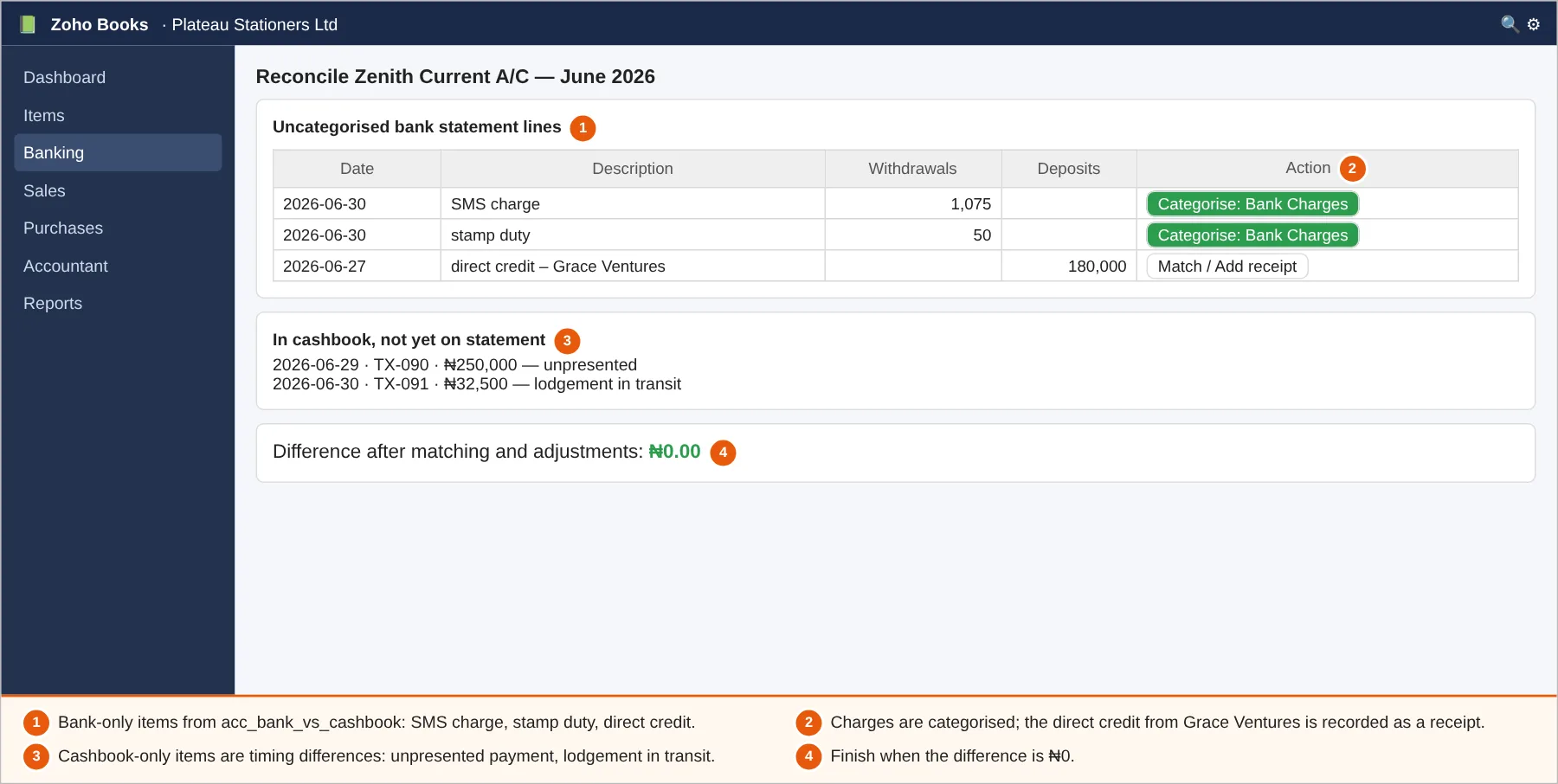
Try it yourself — step by step
- Go to Banking and open the bank account.
- Import the bank lines from acc_bank_vs_cashbook.
- Click Match for each line that agrees with a recorded transaction.
- Categorise the SMS charge and stamp duty as Bank Charges; record the Grace Ventures credit.
- Finish when the difference shows ₦0.
Why balances differ
Differences usually come from timing and omissions: cheques or transfers issued but not yet cleared (unpresented), deposits recorded but not yet credited (uncredited lodgements), bank charges, SMS fees, stamp duty and interest not yet recorded, direct credits from customers, and errors by either party. Each must be identified and explained.
Matching in Zoho Books
Banking → select the account → import the bank statement (CSV or connected feed). Zoho suggests matches with existing transactions. Confirm each match; for unrecorded items such as a ₦1,075 SMS charge, choose Categorise → Expense → Bank Charges. For a customer transfer not yet recorded, categorise it as Customer Payment against the right invoice.
Completing the reconciliation
Click Reconcile, enter the statement closing balance of ₦3,184,500 and date 30 June. Tick cleared items. Remaining uncleared items — such as an unpresented transfer of ₦250,000 and a lodgement of ₦32,500 in transit — explain the difference. When the difference shows ₦0.00, save. Print or export the reconciliation as evidence.

Build the prompt from three phrases — Role, Task and Format — and watch the AI answer.
Generating and sharing reports
Reports → Profit and Loss, Balance Sheet, Cash Flow Statement, Trial Balance, AR/AP Aging and Sales by Customer. Set the period, compare with the previous period, then Export as PDF or Excel, or Schedule to email the MD monthly. Share only with authorised people and use password-protected files for sensitive reports.
Common mistakes to avoid
Common mistakes include 'forcing' a reconciliation by adding an unexplained adjustment, matching a transaction to the wrong invoice because amounts are similar, reconciling months late, and leaving old uncleared items for months without investigating. Old unpresented cheques often hide errors or fraud.
Practice exercise
Download the bank statement and cashbook sample. Identify unpresented payments, uncredited lodgements and bank charges. Prepare the reconciliation in Zoho Books or on paper so the difference is zero, then export a June profit and loss report as PDF.
Lesson summary
Reconcile bank accounts monthly: match transactions, record bank charges and direct credits, and explain timing differences until the difference is zero. Zoho Books then produces profit and loss, balance sheet, cash flow and aging reports for export and scheduled sharing.
You are an accounts supervisor. Explain why the bank shows ₦3,184,500 while the books show ₦3,402,000, given an unpresented transfer of ₦250,000, a lodgement in transit of ₦32,500 and an unrecorded SMS charge of ₦1,075 as a short reconciliation statement.
Answer all three questions and check your answers to unlock the next lesson. Pass mark: 2 of 3.
A ₦1,075 SMS alert fee on the statement but not in your books should be…
Adding an unexplained adjustment to make the reconciliation balance is…
Which Zoho Books report lists balances owed by customers by age?