
Errors, irregularities, duplicate payments and fraud risks
Listen to this lesson
Nigerian voice narration
Fictional training case. While reviewing a Lagos logistics company's supplier payments for the quarter, you notice two payments of ₦1,275,000 to the same mechanic on dates three days apart, a fuel supplier paid on a Sunday, and several receipts missing. Is this error, irregularity or fraud? This lesson teaches you to tell the difference and to use Excel to find such patterns quickly.

Introduction and objectives
Errors are unintentional; irregularities and fraud involve breaches of rules or deliberate deception. This lesson covers common errors, financial irregularities, fraud risk indicators and Excel techniques for detecting duplicates, missing documents and unusual transactions. By the end you should be able to run basic data tests and report concerns responsibly.
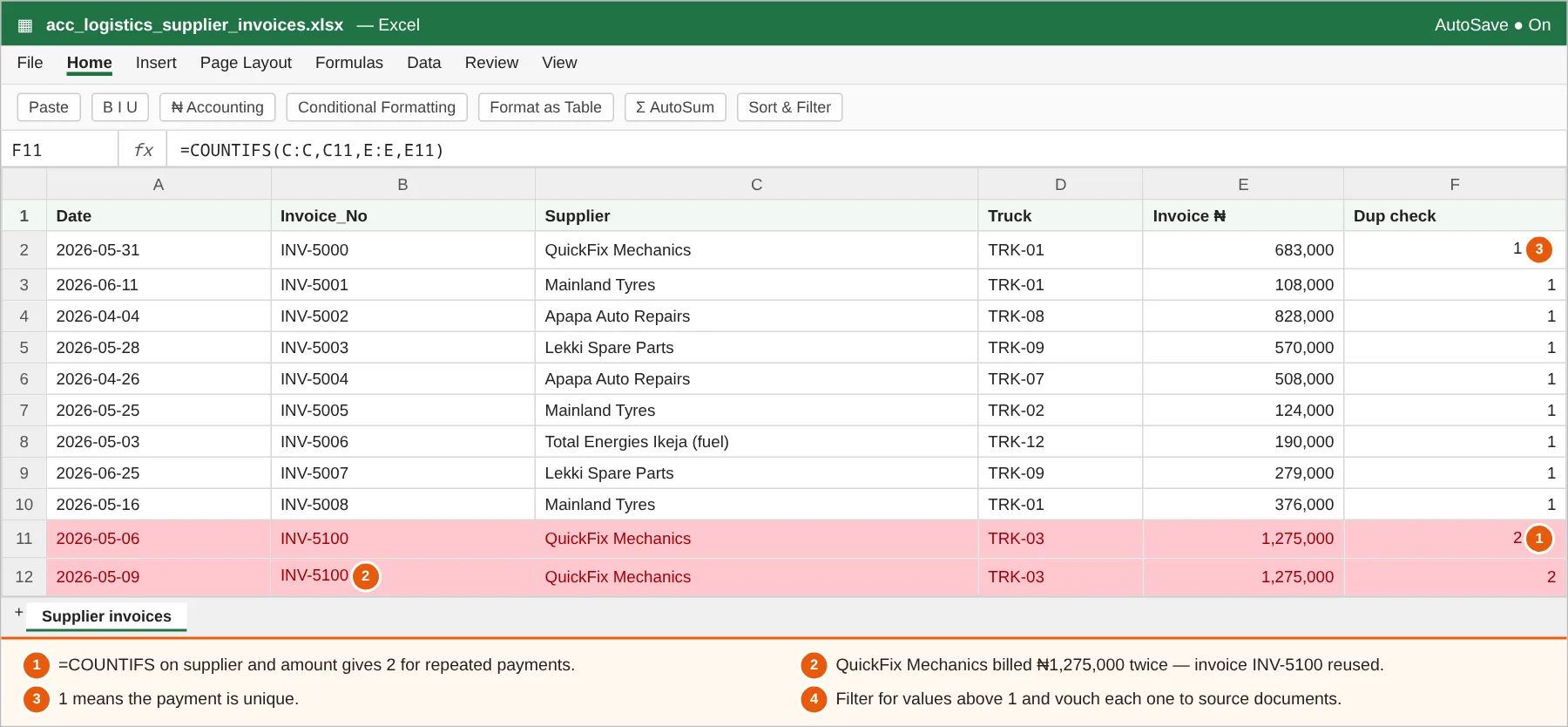
Try it yourself — step by step
- Add a helper column called Duplicate check.
- In F2 type =COUNTIFS(C:C,C2,E:E,E2) (same supplier, same amount).
- Copy the formula down the register.
- Filter for values above 1 and investigate each flagged payment.
Errors versus irregularities and fraud
Errors include wrong amounts, transposed digits (₦54,000 typed as ₦45,000), wrong accounts and omissions. Irregularities are breaches of procedure, such as paying without approval. Fraud is intentional deception for gain: fictitious suppliers, inflated invoices, ghost workers, duplicate payments collected through a friendly supplier. Auditors detect indicators; investigators prove fraud.
Red flags to recognise
Watch for duplicate invoice numbers or amounts, round-figure payments, payments just below approval limits, new suppliers sharing staff addresses or bank accounts, weekend or holiday transactions, missing receipts, frequent manual journals, vendors with no physical address, and staff who resist leave or audit. The fraud triangle — pressure, opportunity, rationalisation — explains why controls matter.
Excel tests for detection
Duplicates: create a key =[@Supplier]&"|"&[@Amount] and use =COUNTIF([Key],[@Key])>1. Missing support: filter Receipt Attached = 'No'. Weekend payments: =WEEKDAY([@Date],2)>5. Just-below-limit: =AND([@Amount]>=950000,[@Amount]<1000000). Unusual: sort by amount, or flag values above three times the supplier's average.
Build the prompt from three phrases — Role, Task and Format — and watch the AI answer.
Reporting responsibly
When you find indicators, gather the facts and evidence, do not accuse anyone, and keep the matter confidential. Report through the proper channel — your head of audit, audit committee or whistleblowing policy — in writing. Do not alert the people involved or discuss it on WhatsApp. Preserve documents and let authorised investigators take over.
Common mistakes to avoid
New auditors sometimes announce 'fraud' on the basis of one red flag, tip off the person involved, or delete 'duplicates' from the data instead of reporting them. Others rely only on data tests and never check documents. A flag is a reason to look further, not a conclusion.
Practice exercise
Download the logistics supplier invoices file. Build the duplicate key, weekend flag, just-below-limit test and missing-receipt filter. List every exception with date, supplier and amount, and write a short, neutral note to your head of audit summarising what needs further examination.
Lesson summary
Distinguish errors (unintentional) from irregularities and fraud (rule breaches or deliberate deception). Know the red flags, use simple Excel tests to find duplicates, weekend, missing-support and just-below-limit transactions, and report concerns confidentially through proper channels.
You are a forensic data analyst for internal audit. Give me Excel formulas to flag duplicate payments, weekend payments and payments just below a ₦1,000,000 approval limit as three formulas with a one-line explanation each.
Answer all three questions and check your answers to unlock the next lesson. Pass mark: 2 of 3.
₦54,000 recorded as ₦45,000 is an example of…
=WEEKDAY([@Date],2)>5 identifies…
If you suspect fraud, you should…